
Annotation Floating Menu
The Floating Menu is a convenient feature available in IceViewer that provides users with quick access to useful annotation tools. This menu appears automatically after placing or selecting specific annotation types on the document.
The floating menu is available for the following annotation types:
Highlight, Rectangle, Rounded Rectangle, Ellipse, Line, Arrow, and Pencil.
Once the annotation is placed or selected, the floating menu appears above the placed annotation and includes the following option:
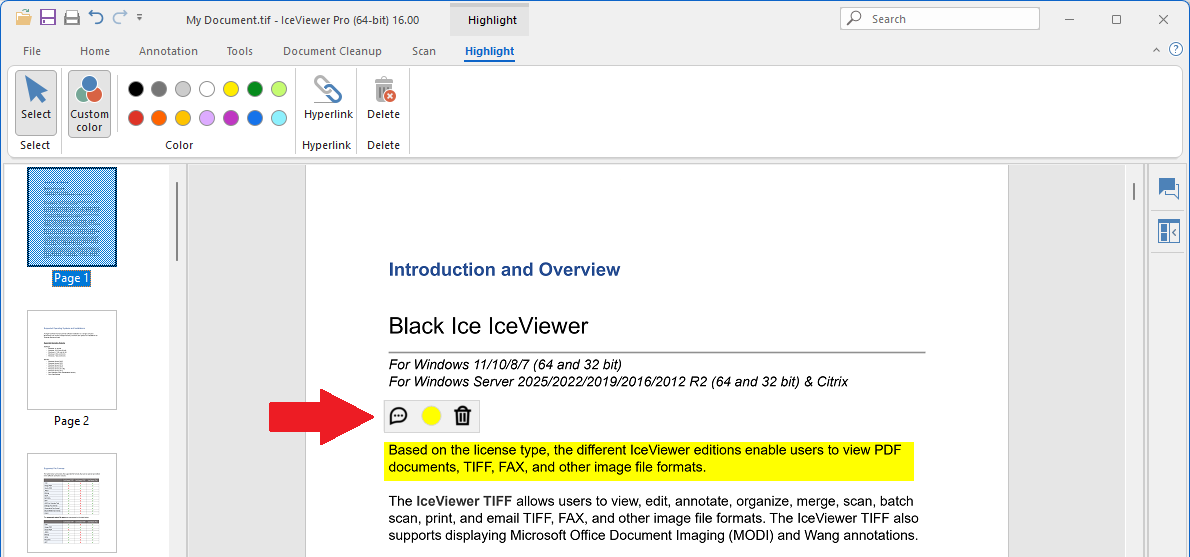
Comment (Reply): Enables users to add a comment or reply to the selected annotation, facilitating collaboration or clarification.

Annotation Color: Opens the color selection window to adjust the color of the annotation.

Delete Annotation: Removes the selected annotation from the document.

Increase or Decrease Line Width: Allows users to adjust the thickness of the annotation’s border or stroke. This option is only available for annotation types that support line width customization, such as Rectangle, Rounded Rectangle, Ellipse, Block Arrow, Line, Arrow, and Pencil.
.png)