
Jump to main content
Black Ice Software logo
IceViewer Online Manual
  • Introduction and Overview
  • Installation, Licensing and Registration
  • Using the IceViewer TIFF, IceViewer PDF and IceViewer Pro
    • IceViewer Options
    • Opening Files
    • Combine Files
    • Saving Files
    • Password protect PDF documents
    • Printing
    • Editing an Image
    • Viewing Images and Documents
    • Add Signature
    • Add Text and Marks to the Document
    • OCR & Search
    • Text Search
    • Optical character recognition
    • Send Email
    • Organize PDF Documents
      • Rotate pages
      • Move page
      • Insert page(s) or Merge documents
      • Flatten PDF Pages
      • Extract page(s)
      • Delete page
      • Copy or Move Pages from one document to another
      • Split into two parts
      • Cut into pages
      • Delete file
    • Organize TIFF Documents
    • Getting Information about a File
    • Annotating TIFF Documents
    • Annotating PDF Documents
    • Editing Text in PDF Documents
    • Add and edit hyperlinks
    • Using the Comments Panel
    • Document Cleanup
    • Scanning
    • Keyboard shortcuts
    • Quick Start - Hotkeys
    • IceViewer for Tablets
    • Configure the default file association on Windows 11 and 10 with Group Policy
    • Configuring default viewer on Windows Server 2025, 2022, 2019 and 2016 using Group Policy
    • The IceViewer INI File
  • Using the Google Chrome and Microsoft Edge extension
  • Using the IceViewer Core Web Application
  • Using the Microsoft IE Browser Plug-In
  • Troubleshooting and Support
  • Licenses

Organize PDF Documents

The IceViewer PDF and IceViewer Pro include intuitive features for organizing, merging, combining, and splitting PDF documents, as well as rotating or deleting pages with ease.
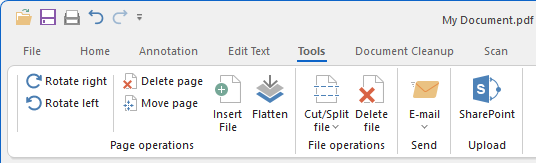
The following options are available:

Rotate pages

Move page

Insert page(s) or Merge documents

Flatten PDF Pages

Editing Text in PDF Documents

Extract page(s)

Delete page

Copy or Move Pages from one document to another

Split into two parts

Cut into pages

Delete file

© Black Ice Software, LLC 1989 - 2026. All rights reserved.