General
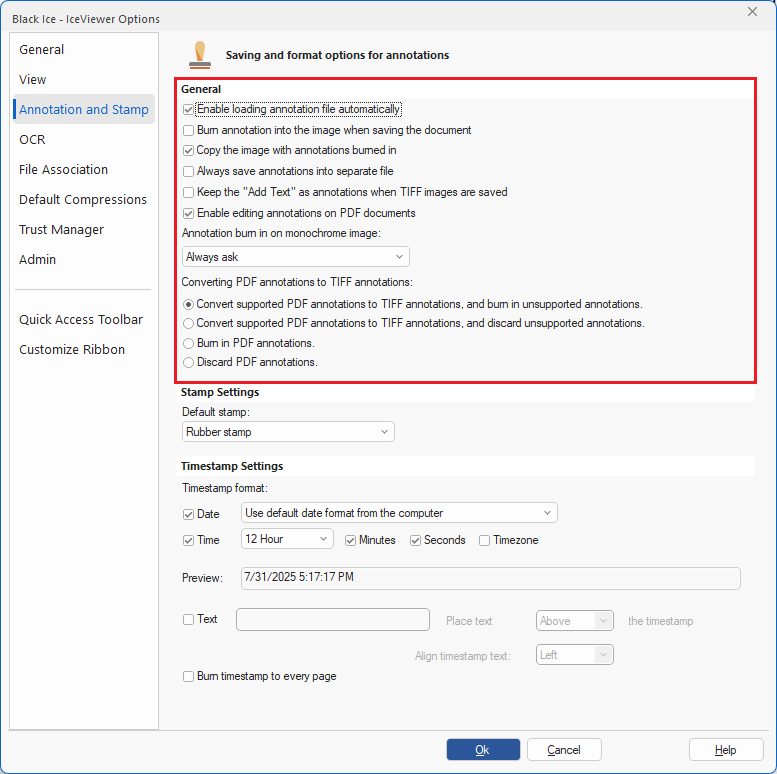
In this section, one can configure general settings relating to annotations within the IceViewer.
Enable loading annotation file automatically (checked by default) - If checked, this option allows users to load the annotation file automatically.
Burn annotation into the image when saving the document - If checked, when the user saves the document, this option will automatically burn the annotation into the TIFF image, so it will no longer be editable.
Copy the image with annotations burned in - If checked, IceViewer burns in the annotations to the copied page, so annotations will be visible in applications other than the IceViewer. The option only affects pages pasted into other applications. When copy-pasting pages into the IceViewer, the annotations remain editable. (enabled by default)
Always save annotations into separate file - When checked, the IceViewer will always save the annotation(s) into a separate file, enabling users to add the annotations(s) to other TIFF images. For more information, please see Save Annotation .
Keep the “Add Text” as annotation when TIFF images are saved – When checked, the IceViewer keeps text added with the "Add Text" tool as an annotation instead of burning it into the TIFF image, allowing users to edit or remove the annotation later. (disabled by default)
Enable editing annotations on PDF documents - If this option is enabled, PDF annotations placed on the opened document will be selectable and editable. (enabled by default)
Annotation burn-in on monochrome image dropdown:
- Always ask (default)
- Convert image to color
- Convert annotation to monochrome
Converting PDF annotations to TIFF annotations
Convert supported PDF annotations to TIFF annotations, and burn in unsupported annotations - PDF annotations will be converted into TIFF annotations when a PDF document with annotations is saved into TIFF. Unsupported annotations will be burned in. (enabled by default)
Convert supported PDF annotations to TIFF annotations, and discard unsupported annotations - PDF annotations will be converted into TIFF annotations when a PDF document with annotations is saved into TIFF. Unsupported annotations will be discarded.
Burn in PDF annotations - PDF annotations will be burned in when a PDF document with annotations is saved into TIFF.
Discard PDF annotations – PDF annotations will be discarded when a PDF document with annotations is saved into TIFF.