
Zooming
Black Ice IceViewer can zoom in on images using a variety of different methods.
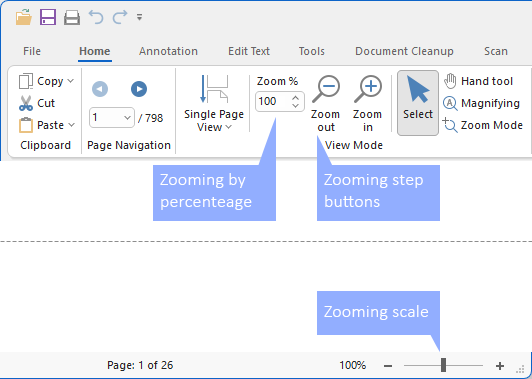
Zoom In
Zoom in on the image by 10% if the current zoom of the image is lower than 100%; otherwise, the button zooms in on the image by 25%.
Zoom Out
Zoom out on the image by 10% if the current zoom of the image is lower than 100%; otherwise, the button zooms out on the image by 25%.
Zooming Scale
Users can also zoom in and out by moving the zooming scale on the status bar.
Zooming by percentage
Allows the user to specify their own zoom percentage for zooming.
Zoom Mode
Selecting this option will activate or deactivate zooming. Checking this option means that the option is currently active. When active, clicking on the image results in a zoom in.