
Saving a TIFF File to Use Different compression
(Available in the IceViewer TIFF and the IceViewer Pro)
Changing the compression for a TIFF file is easy using the IceViewer. Simply use the Save As feature of the IceViewer, which brings up the following window:
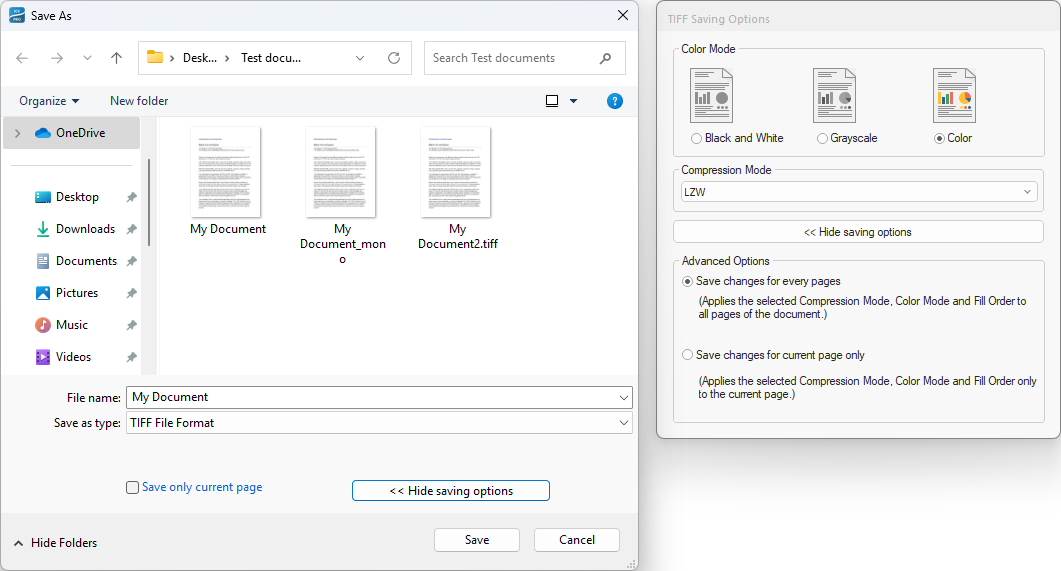
The compression method to be used can be specified in the Compression Mode section of the window on the right. Once a selection is made, press OK to save the file with the new settings.
The following compression modes are available:
For black and white images:
- CCITT G4 – smallest file size, recommended
- CCITT G3 1D No EOL
- CCITT G3 1D EOL
- CCITT G3 2D
- Pack Bits
- LZW
- No compression – largest file size, not recommended
For grayscale and color images:
- JPEG – smallest file size
- Pack Bits
- LZW – best image quality
- LZW Differential
- No compression – largest file size, not recommended