
Administrator Settings
The Administrator tab contains settings that will be applied for every user on the computer.
NOTE: Please note that administrator privileges are required to configure these options.
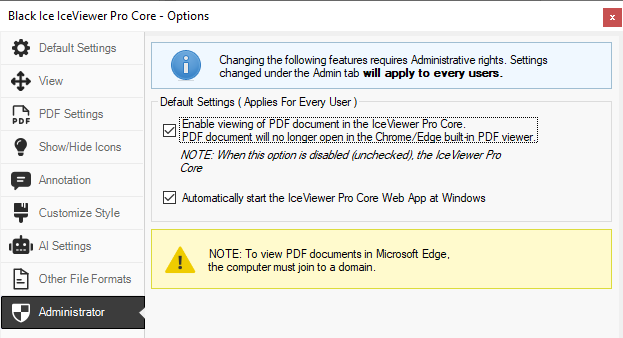
The following settings can be changed:
-
Enable viewing of PDF documents in the IceViewer
Core (available in the IceViewer Pro):
- If enabled, then PDF files will be downloaded and opened in the IceViewer Core. PDF files will no longer open in the built-in PDF viewer of the Chrome/Edge browser.
- If disabled, then PDF files will be opened in the built-in PDF viewer of the Chrome/Edge browser. The IceViewer Core will not open PDF files.
- If the Automatically start the IceViewer Core Web App at Windows Startup option is enabled, the IceViewer Core application starts in the background when Windows starts. (enabled by default)
After saving the changes, please restart the browser to apply the changes.