
Configure Roaming Domain Users through Group Policy
To configure Roaming Domain Users on a server—or to apply Print2Email settings to domain user desktops after installation—Black Ice Software provides the BiSetProfileFile.exe utility. This tool can be deployed through a Group Policy (GPO) login script, ensuring settings are applied each time a user logs in.
Before creating the script, export the desired Print2Email configuration as an .INI file using the Export Print2Email Configuration option. This INI file will be applied automatically by the login script for each user.
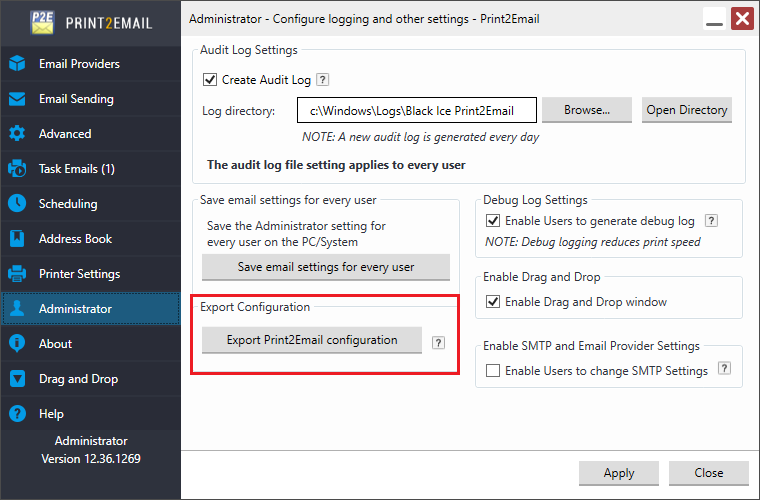
Once the configuration (.INI) file is generated and tested.
Please download BiSetProfileFile.zip from the following link:
https://www.blackice.com/downloads/BiSetProfileFile.zip
Unzip BiSetProfileFile.zip, which contains the following files:
- BiSetProfileFile.exe
- BlackIceDEVMODE32.dll
- BlackIceDEVMODE64.dll
To use BiSetProfileFile.exe:
- Run the BiSetProfileFile.exe with the following parameters:
- Printer name
- Profile file with full path
For example:
Copy the exported configuration file (MyConfiguration.INI) to the shared directory on the local system or on the network.
Open the Group Policy Management and add new logon script to the system:
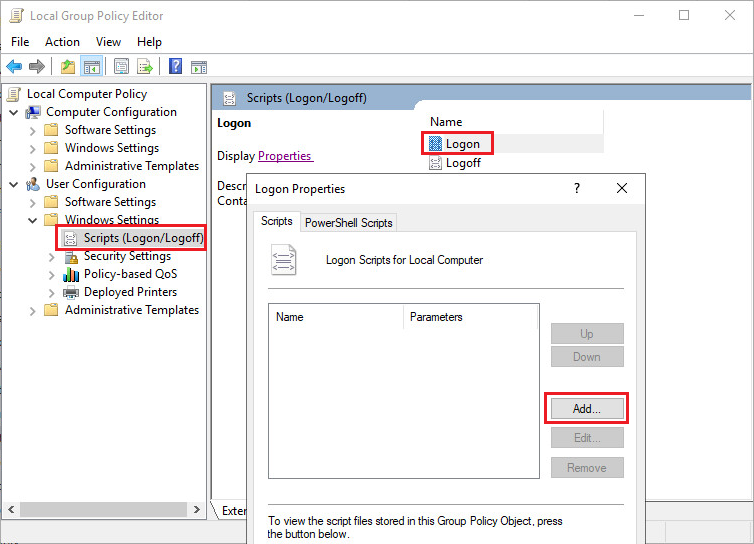
Add Script Name:
[Shared directory path]\BiSetProfileFile.exe
For Example:
“\\Anyserver\Temp\ BiSetProfileFile.exe”
Add Script Parameters:
"[Printer name]" "[Shared directory path]\MyConfiguration.INI"
For Example:
“Print2Email” "\\AnyServer\Temp\MyConfiguration.INI"
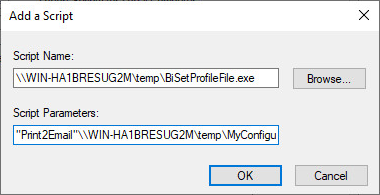
Click on the OK button to apply.
Once GPO configuration is created, the Roaming Domain User printer driver is configured every time a Roaming Domain User logs in to the system.
Requirements:
- Microsoft .NET Framework version 4.0 or higher
http://www.microsoft.com/en-us/download/details.aspx?id=24872