
Add HTML Signature to your Emails
Print2Email allows users to create professional, HTML-based email signatures for both SMTP and Outlook clients. Print2Email can read standard HTML, enabling fully customized signatures for all outgoing emails.
Users can either write their own HTML signature or choose from available templates and replace the name and logo as needed.

HTML Code:
| <html><body><table cellpadding="0" cellspacing="0"><tr><td style="border-bottom:3px solid #0596d3;border-right:3px solid #0596d3;"><img src="http://www.blackice.com/broadcast/05042017P2E/sig4.png" /></td><td style="padding:0px 20px 0px 20px;border-top:3px solid #0596d3;line-height:24px;color:#0596d3;font-family:Arial;">Black Ice Software, LLC<br />Phone: +1 561-757-4107<br />Web: <a href="http://www.blackice.com">www.blackice.com</a></td></tr></table></body></html> |

HTML Code:
| <html><body><table cellpadding="0" cellspacing="0"><tr><td style="border-right:1px solid #0055A5;"><img src="http://www.blackice.com/broadcast/05042017P2E/sig1.png" /></td><td style="padding-left:10px;padding-top:10px;line-height:24px;color:#0055A5;font-family:Arial;">Black Ice Software, LLC<br />Phone: +1 561-757-4107<br />Web: <a href="http://www.blackice.com">www.blackice.com</a></td></tr></table></body></html> |

HTML Code:
| <html><body><table cellpadding="0" cellspacing="0" bgcolor="#5cc4ff"><tr><td style="border-right:1px solid #bbedff;"><img src="http://www.blackice.com/broadcast/05042017P2E/sig2.png" /></td><td style="padding:0px 20px 0px 20px;line-height:24px;color:#fff;font-family:Arial;">Black Ice Software, LLC<br />Phone: +1 561-757-4107<br />Web: <a href="http://www.blackice.com">www.blackice.com</a></td></tr></table></body></html> |

HTML Code:
| <html><body><table cellpadding="0" cellspacing="0"><tr><td style="border-right:3px solid #0596d3;"><img src="http://www.blackice.com/broadcast/05042017P2E/sig3.png" /></td><td style="padding:0px 20px 0px 20px;line-height:24px;color:#0596d3;font-family:Arial;">Black Ice Software, LLC<br />Phone: +1 561-757-4107<br />Web: <a href="http://www.blackice.com">www.blackice.com</a></td></tr></table></body></html> |
If one would like to use one of the templates from above, one must substitute the company logo and the contact information in the HTML code, as in the example below:
Change:
| <html><body><table cellpadding="0" cellspacing="0"><tr><td style="border-bottom:3px solid #0596d3;border-right:3px solid #0596d3;"><img src="http://www.blackice.com/broadcast/05042017P2E/sig4.png" /></td><td style="padding:0px 20px 0px 20px;border-top:3px solid #0596d3;line-height:24px;color:#0596d3;font-family:Arial;">Black Ice Software, LLC<br />Phone: +1 561-757-4107<br />Web: <a href="http://www.blackice.com">www.blackice.com</a></td></tr></table></body></html> |
Change to:
| <html><body><table cellpadding="0" cellspacing="0"><tr><td style="border-bottom:3px solid #0596d3;border-right:3px solid #0596d3;"><img src="http://www.mywebsite.com/myimages/mysignature.png" /></td><td style="padding:0px 20px 0px 20px;border-top:3px solid #0596d3;line-height:24px;color:#0596d3;font-family:Arial;">My Company Name<br />Phone: +1 555-555-5555<br />Web: <a href="http://www.mywebsite.com">www.mywebsite.com</a></td></tr></table></body></html> |
Once the HTML is done, one can set it up in Print2Email.
To add a signature to the emails sent by Print2Email, enable the Add Signature to Emails option in the Email Sending tab, select the Use a custom signature option, and click on the Edit Signature button to open the editor.
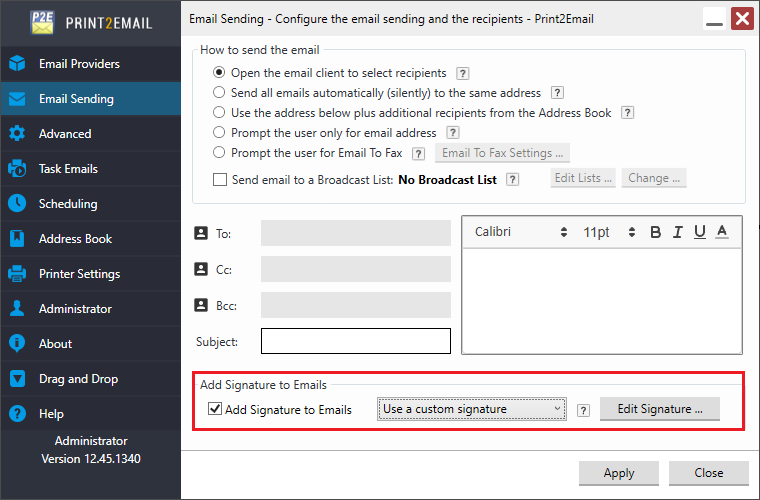
The editor window will appear. Click on the HTML Editor button in the top-right corner to paste HTML code.
.png)
Once finished editing, press the Save button to save the signature.
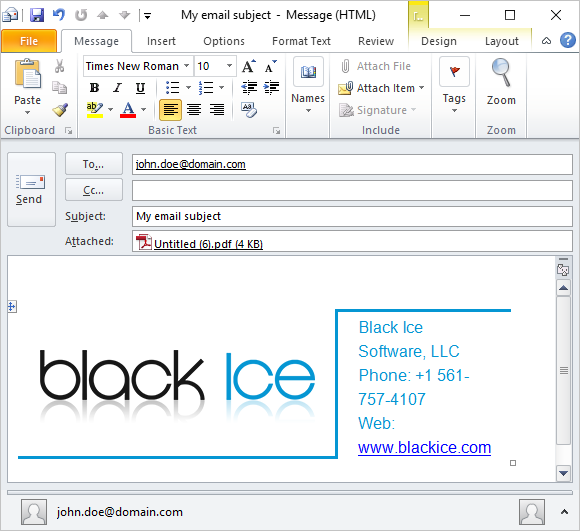
Sending an email from now on with Outlook will show the signature in the email body:
NOTE: Advanced HTML formatting signatures are not supported when the “Use legacy MAPI for email sending (Display Outlook Security Alert Window)” option is enabled.
NOTE: When sending an email with other email providers, such as Gmail, Outlook.com, Yahoo, or a custom SMTP server, the signature will not be displayed in the email sender window, but will be appended automatically to the outgoing emails.