
Changing the update settings
Updater settings apply to the entire computer and can only be changed by an administrator. When the application is not running with administrator privileges, the Settings gear remains visible but is disabled.
To modify the settings:
- Exit the Black Ice Automatic Update application from the system tray.
- Start the application using Run as administrator.
- Click File > Help > Check for Updates or File> Options > Admin > Check for updates.
- Select the Settings gear icon.
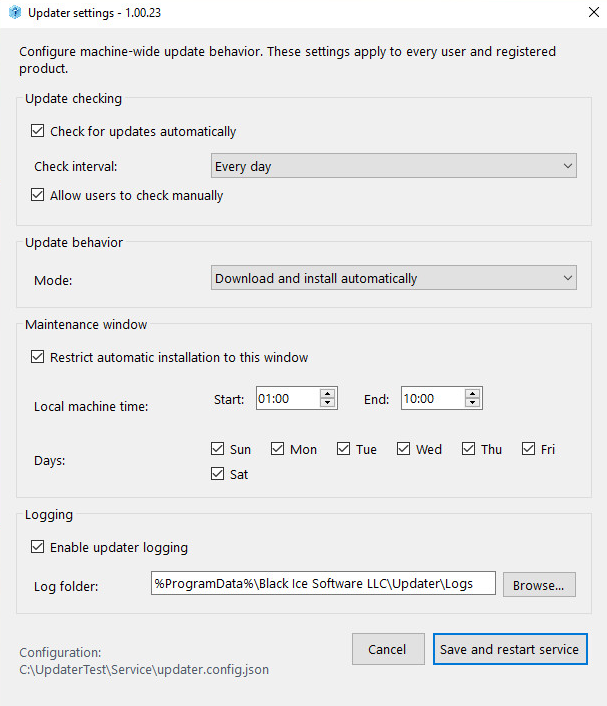
- Configure the available options:
-
- Check for updates automatically: Enables or disables scheduled update checks.
- Check interval: Controls how often the updater checks for a new version.
- Allow users to check manually: Determines whether users can select Check for updates.
- Update mode: Controls whether updates are disabled, shown to the user for approval, or installed automatically.
- Maintenance window: Specifies the days and times during which automatic installation may occur.
- Enable updater logging: Enables or disables updater log files.
- Log folder: Specifies where updater log files are stored.
-
- Select Save and restart service.
The updater service restarts automatically, and the new settings take effect immediately.