
Using Print2Email with Yahoo Small Business email account
Yahoo Small Business requires explicit account holder approval for third-party applications, like Print2Email, to access email accounts. To use Print2Email with Yahoo Small Business, you must generate an app password. Log in to your Yahoo Small Business account and follow the instructions here: Yahoo Small Business App Passwords
To configure the Print2Email to use Yahoo for sending emails, go to Print2Email > Email Providers tab > Select the Custom SMTP email Server and uncheck Ask for the provider every time when sending an email checkbox.
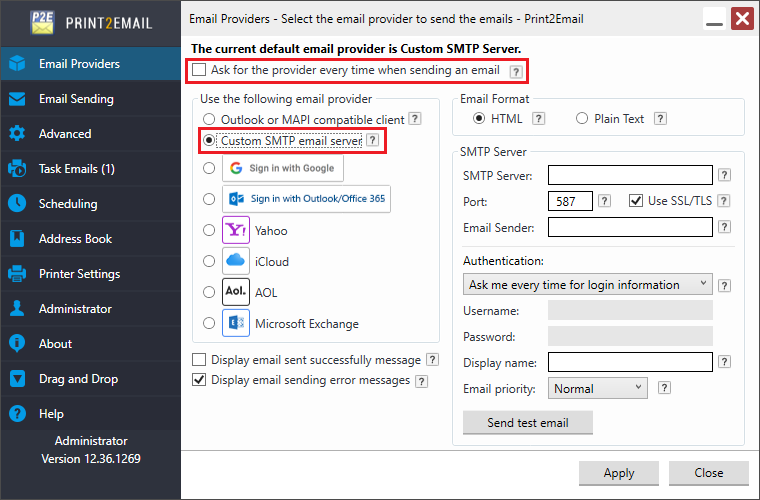
Please configure the SMTP Settings as the following:
- SMTP Server: smtp.bizmail.yahoo.com
- Port: 587
- Check the Use SSL\TLS checkbox
- Username: user’s business email address
- Password: the generated app password
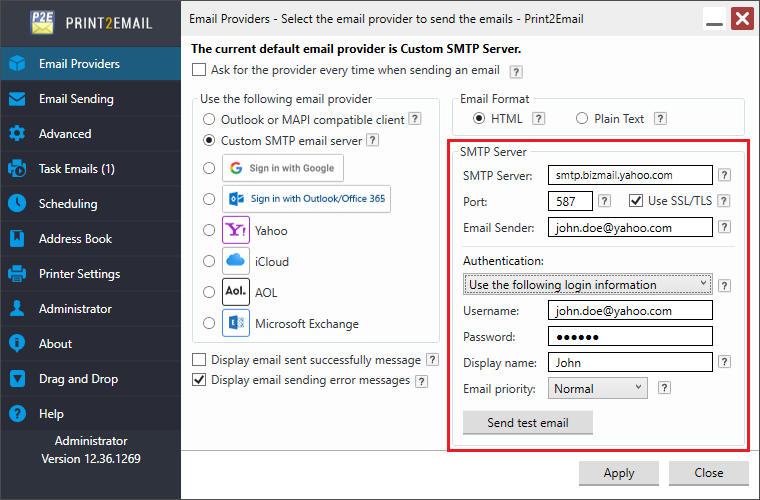
If Display email sent successfully message is enabled, Print2Email will show a confirmation message after an email is sent.
If Display email sending error messages is enabled, any SMTP-related errors are shown when an email fails to send.
Email Format
- HTML – Format message as HTML. HTML message can contain formatting and are compatible with most e-mail readers.
- Plain Text – Format message as plain text. Plain text can be read by everyone but contains no formatting.
Sender Account Settings
- Ask me every time for account settings
Select the “Ask me every time for account settings” option, to enter the email sender account name and password every time an email is sent.
- Use the following account settings
Select the “Use the following account settings” to enter the account name and password. The Print2Email will use these settings automatically every time when sending an email.
Under Authentication settings Print2Email users can also set how recipients will see the message in their email clients (for example, Outlook). The following options are available:
- Display name field does not need to be a valid email address. Display name can be any text or name of the individual or the company.
- Priority defines the importance of the email message. If the email is important, one can configure High priority for the email, and the email will be displayed as important email for the recipient.
By clicking on Send test email button the user can test the SMTP account settings.
When finished, click on the Apply button to save the changes. From now on, every document printed to the Print2Email printer driver will be opened in the Print2Email Email Sender to let users send the printed documents in email quickly and easily using the configured Yahoo account.
.png)