
SSL connection errors when sending emails
Print2Email may report that the configured Email Provider/SMTP Server requires an SSL connection for sending emails.
Please note that this SSL-related error message typically originates from the email provider or SMTP server, not from Print2Email itself. This suggests that there may have been a misconfiguration or a recent change in the server settings.
If your SMTP server requires an SSL connection, then please make sure that you have the Use SSL/TLS option enabled in Print2Email:
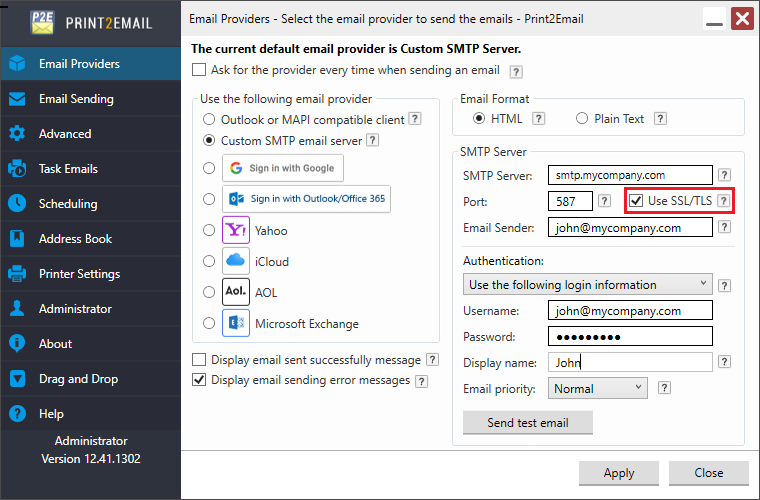
If the problem persists, here are some possible reasons for this error and how to address them:
Invalid SSL/TLS Certificate
- The certificate used by the SMTP server in the Print2Email might be expired, revoked, or not yet valid.
- The certificate's hostname does not match the hostname of the SMTP server configured in Print2Email.
- The certificate is self-signed or issued by an untrusted Certificate Authority (CA).
Possible Solutions:
- Verify the SMTP server's certificate using tools like online SSL checkers, such as: https://www.sslshopper.com/ssl-checker.html
- Ensure the certificate is valid, not expired, and matches the SMTP server's domain that is configured in Print2Email.
- Use a certificate issued by a trusted CA.