
Line Annotation
Line Annotations allow the user to create a straight line or an arrow from a base point in any direction.
To add Line Annotations to TIFF or PDF documents, please click on the Annotations icon on the top toolbar, select the Line Annotation option from the dropdown menu and draw the annotation on the page by clicking and holding down the left mouse button while moving the cursor.
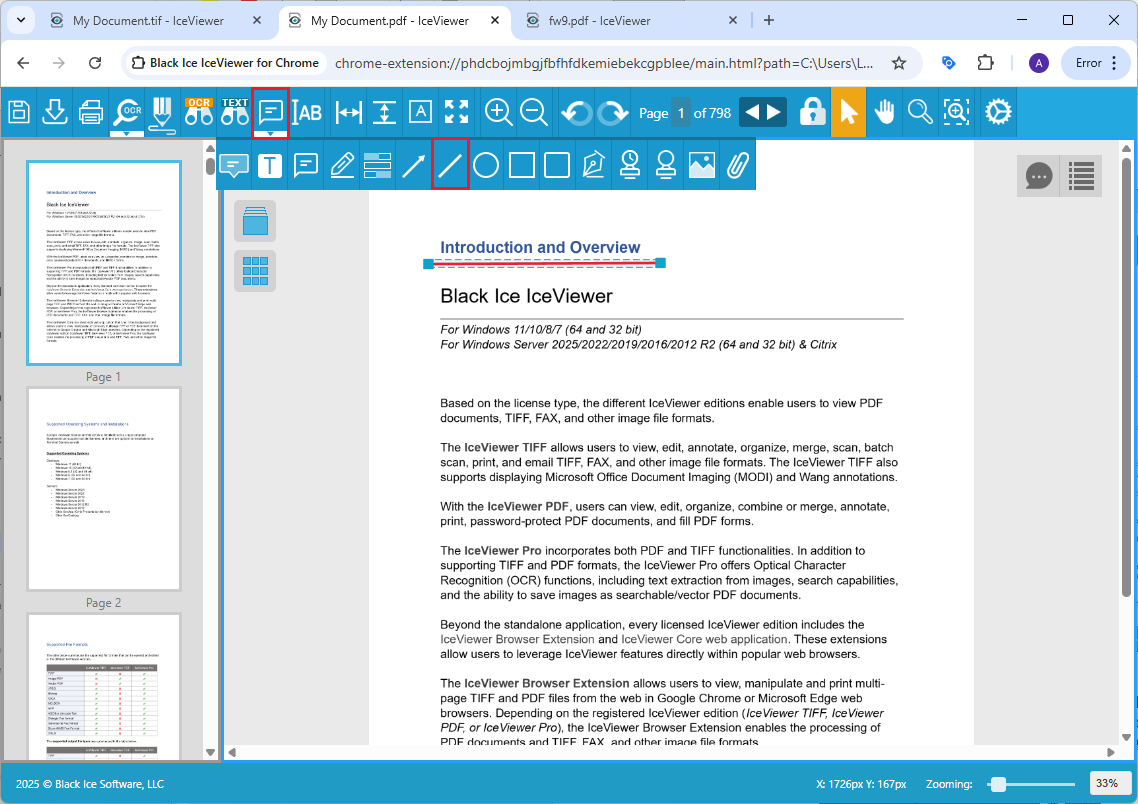
By clicking once on the placed annotation on the document, the Line Annotation Properties window appears where one can select the color, type and width of the Line Annotation. To create an Arrow annotation out of a Line Annotation, please change the arrow type. The following arrow types are available: Line, Arrow, Filled arrow, Double arrow, and Double filled arrow.
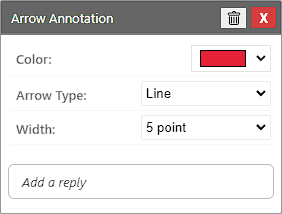
Please click on the Close button to finish editing.
Annotation Replies
In IceViewer Browser Extension, users can add replies to every annotation type, allowing team members to provide feedback, ask questions, or offer further insights in a structured manner. To add an initial reply, please start typing into the Add a reply field and save the reply.
For more details, please visit the Annotation Replies section of the manual.