
Requirements
- Computers must have active internet connection to download and install the Black Ice IceViewer Browser Extension from the Google Store.
- To use the IceViewer Browser Extension, the IceViewer TIFF, IceViewer PDF or IceViewer Pro application has to be installed on the computer.
Using the Extension with Google Chrome
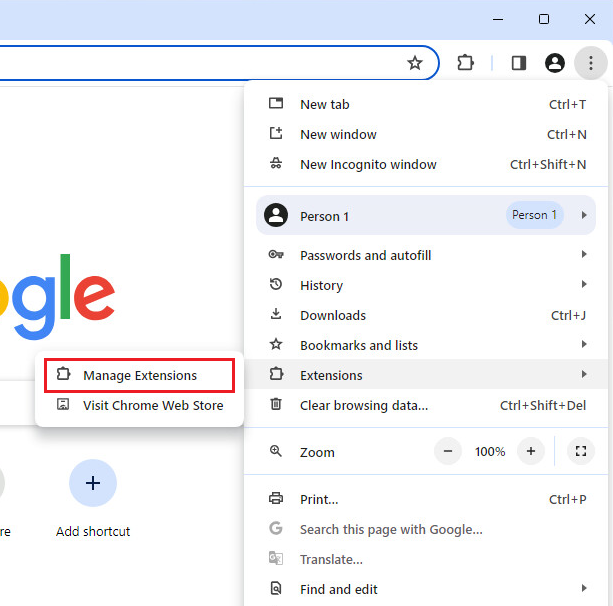
To make sure that the Google Chrome Extension is installed and enabled, please follow the steps:
Please go to the More tools > Extensions:
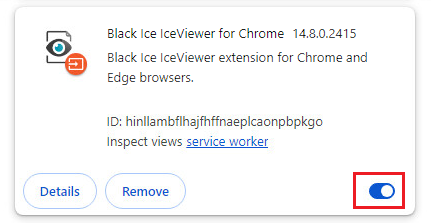
Make sure that the Black Ice IceViewer extension is enabled as on the following image:
If the extension is not installed, please follow the instructions in the The IceViewer extension is not installed, how do I install it manually? section.
Using the Extension with Microsoft Edge
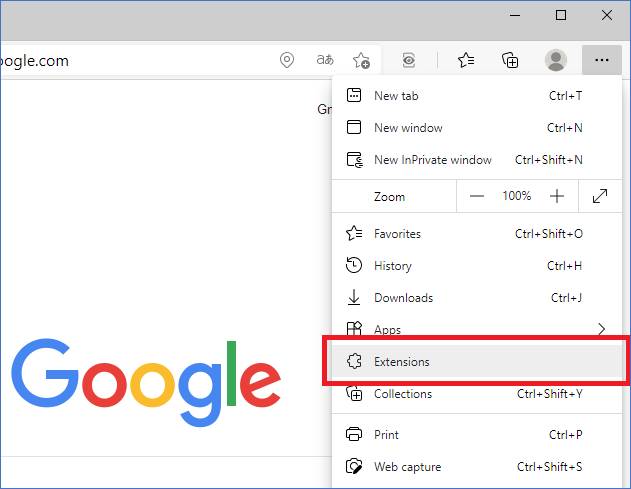
To make sure that the Microsoft Edge Extension is installed and enabled, please follow the steps:
Please go to the Extensions:
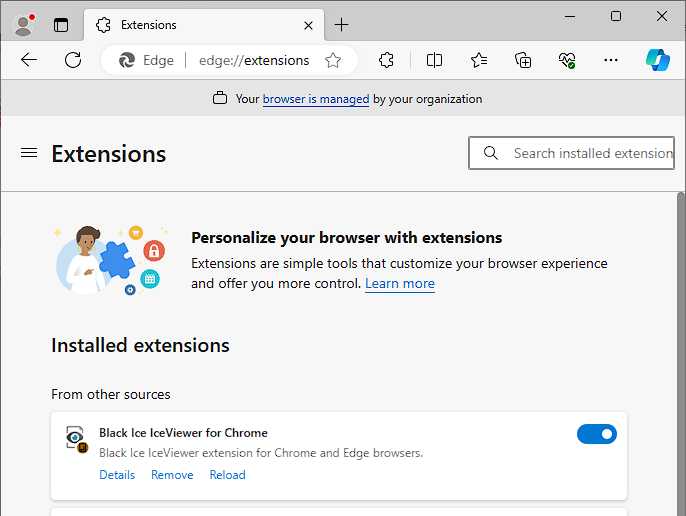
Make sure that the Black Ice IceViewer extension is enabled, as on the following image:
If the extension is not installed, please follow the instructions in the The IceViewer extension is not installed, how do I install it manually? section.