
Create Audit Log
When Create audit log option is enabled, Print2Email will log every sent email, date, recipients and the username who sent the email. This option is recommended for Administrators to monitor the outgoing emails sent by Print2Email.
The Audit Log runs as a Windows Service on the system; therefore the audit logging continues even after every user logged off from the computer.
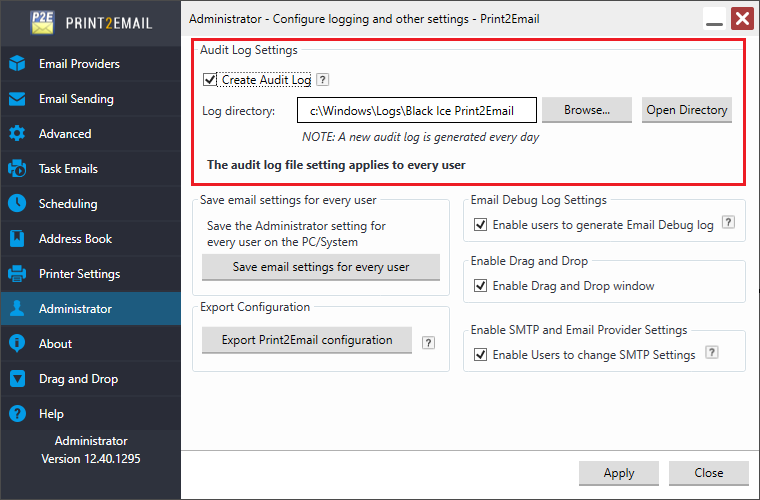
Browse to the directory for where to save the audit log file.
NOTE: The log file directory path cannot be longer than 232 characters.
A new Audit log is generated every day. By pressing the Open Directory button, users can open the directory where the log files are saved.
The Print2Email creates log files by using the current date. For example, if the user uses the Email Sending feature on 20th of July, 2020, the Print2Email creates the following log file into the specified directory:
C:\Windows\Logs\Black Ice Print2Email\Print2Email_07_20_2020.csv
The Audit Log contains the following information:
- Date and Time when the email was sent.
- The status of the email sending.
- The username who sent the email.
- The recipients (To, CC, BCC)
- The sent file names
- The email subject
Example for the Audit Log:
07/20/20 20:01:16,"Sent","John","sales@domain.com"," sales2@domain.com "," sales3@domain.com", "Test.pdf","My subject"
07/20/20 20:02:26,"Sent","John","support@domain.com","info@domain.com","", "Test.pdf","My subject"
07/20/20 20:03:11,"Sent","Tester","developer@domain.com","","", "Test.pdf","My subject"
07/20/20 20:03:16,"Sent","Administrator","sales@domain.com","tester@domain.com ","", "Test1.pdf, Test2.pdf, Test3.pdf","My subject"
The Print2Email Audit Log Windows Service logs can be found at:
C:\Program Files\Black Ice Software LLC\Black Ice Audit Log\Log\