
Install the IceViewer Chrome extension for Google Chrome
To install the IceViewer Chrome extension using Group Policy, Administrators must use the ExtensionInstallForceList policy.
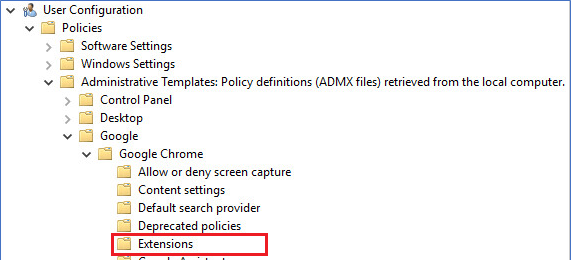
Create new GPO object and navigate to the Policies -> Administrative Templates -> Google -> Google Chrome -> Extensions:
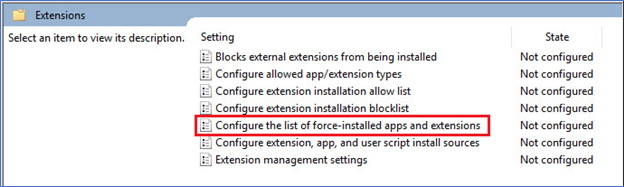
Double-click on the Configure the list of force-installed apps and extensions option:
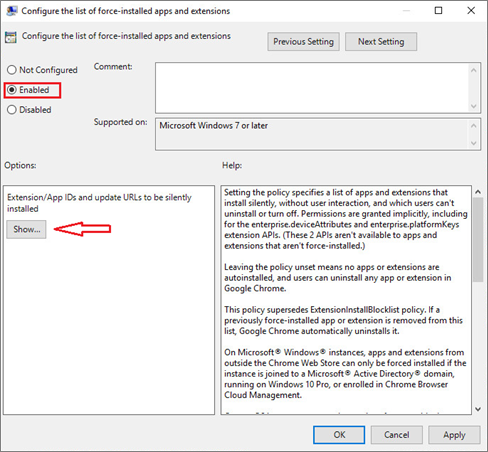
Select the Enabled option and click on the Show… option:
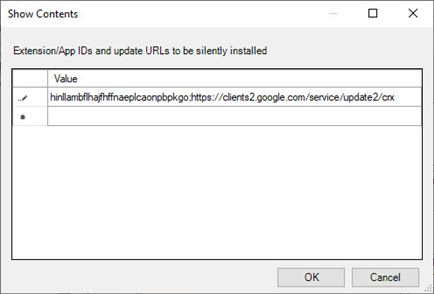
Add the following entry: hinllambflhajfhffnaeplcaonpbpkgo;https://clients2.google.com/service/update2/crx
NOTE: To install the IceViewer Chrome extension, active internet connection is required on the client computer.