
Why are the IceViewer extension setting changes not applied?
When the user changes some of the IceViewer Chrome/Edge extension settings, the changes may not get applied in the extension after refreshing the browser tab. The most common reason is that some specific extension settings require the extension to be reloaded to apply the changes.
NOTE: In the following cases, it’s not sufficient to refresh the browser tab.
The following features require the reloading of the extension:
- Open PDF Support
- Open MO:DCA and IOCA Support
- Open ZIP Support (Open supported files from ZIP archives)
- Force New Tab Feature
- Changing the IFRAME ID
To reload the Chrome/Edge extension, you must close the browser (Google Chrome or Microsoft Edge), then navigate to the bottom-right corner System Tray, right-click on the browser icon, and select the Exit option:
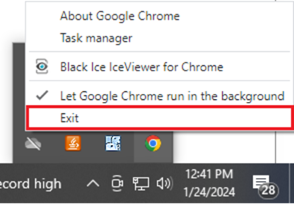
This will close all running Instances of the Chrome/Edge extension.
Start the browser again, and the settings will be applied correctly.