 Buy Now
 Download
In order to assist Black Ice Printer Driver users to accomplish printing and Black Ice Printer Driver related tasks, a Printer Driver Resource Toolkit package is provided FREE of charge with the purchase of any Black Ice OEM Printer Driver.
The Printer Driver Resource Toolkit includes an API and a variety of sample applications with full source code, written in C, C++, Visual Basic, and Delphi. It is also .NET compatible and includes samples written in C#, VB .NET, and J#. Also included are several sample installation scripts and many other tools that can reduce development time and make applications development with the Black Ice Printer Drivers much easier.
The tools and samples included in the Resource Toolkit will help in the following areas:
NOTE: The following samples are not include in the DEMO version of the Printer Driver Resource Toolkit:
- The Printer Driver install samples.
- The following sample source codes:
-
- Auto-print
- BatchConverter
- PrintJobControl
- E-Mail Add-on
- Print2FTP
Printer Driver User Interface Customization.
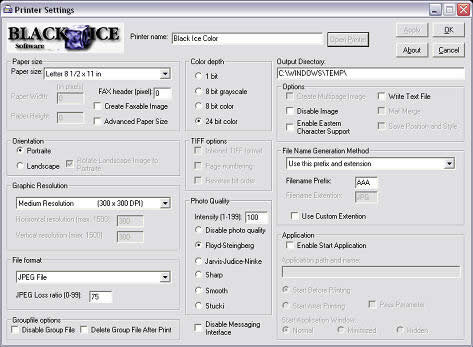
The dialog box templates and other resources used by Black Ice Printer drivers are stored in a separate DLL. The source code for the DLL that contains these resources are included in the Resource Toolkit. By modifying the resource DLL, application developers can customize the user interface of the printer driver. Controls on dialog boxes can be repositioned, resized or even hidden. The only items that cannot and should not be changed are the About box and the version and license information of the printer driver.
Since the name of the resource DLL is stored in the printer drivers DEVMODE structure, the resource DLL can be renamed to avoid conflict with other Black Ice printer drivers installed on a system.
The resource DLL also includes every text string used by the printer driver. Localization / internationalization of the printer driver can be handled very easily by translating these strings to other languages.
The dialog box tabs on the printer driver user interface also can be hidden by modifying a value in the printer driver’s INI file. These INI file setting can be set at installation time or they can be changed anytime, even programmatically from an application. The printer driver will read these values every time the printer driver user interface is displayed.
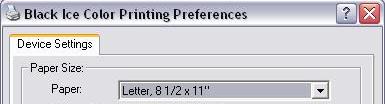
Furthermore, all of the Black Ice printer driver components can be renamed for use in a custom application. In addition to renaming the individual DLLs, the printer driver can be installed with a custom name to provide a more seamless integration into the developed application.
Installation Samples. (Not available in DEMO)
The Resource Toolkit includes an InstallShield, MSI, Visual Basic & VB.NET 8.0 sample projects which install and configure the Black Ice printer driver. The installation sample projects are provided as starting points for creating user specific printer driver installations.
Additionally, the documentation included in the Resource Toolkit contains detailed information on how to install the Black Ice printer driver with a single function call using installation packages other than Install Shield (packages like Wise and Microsoft Installer). Full source code for both an install and an uninstall DLL are also included. These DLLs implement every required function necessary to install and remove a printer driver. The Black Ice printer drivers can be installed or uninstalled using a single function call from the appropriate DLL.
The Install Shield project included in the Resource Toolkit was generated with Install Shield 12 and in order to rebuild the sample installation package Install Shield 12 or newer is required. The Visual Basic installation project was written using VB 6.0. The MSI Install was written using Visual Studio .NET 2005.
Multiple Instances of the Black Ice printer drivers can be installed on a single system, allowing for increased file processing.
Programmatically Change Printer Settings.
Black Ice printer drivers have many settings that affect the way documents are going to be printed. These printer settings can be changed manually through the printer driver's user interface or programmatically from an application without any user interaction.
The Resource Toolkit includes a powerful API (a DLL for C/C++ and an ActiveX control for VB, Delphi, C#, etc) that contains over 300 easy to use functions to control printer driver settings.
Typically, VB environments do not provide any programming capability to change printer settings. However, the Resource Toolkit includes an ActiveX control which is unique in that it allows printer manipulation through VB and it is available only for Black Ice Printer Drivers.
There are several samples included with full source code written in C, C++, VB, VB .NET, C#, J# and Delphi that show how to change printer settings.
The samples were built with Visual C++ 2005, Visual Basic 2005, Visual Studio .NET and Delphi 5.
Programmatically Control and Query Print Jobs (Source code not available in DEMO)
The Print Job Control functionality included in the Resource Toolkit contains features like pausing, restarting and deleting print jobs. Developers can get a list of the current print jobs, then pause or delete any print jobs they need to control. Developers can also query the total number of print jobs for the specified printer and the status of each specified job to see if the job is printing, paused, etc.
Additional print job specific information that can be retrieved from the Black Ice printers includes:
- the name of the machine that created the print job
- the name of the user that owns the print job
- the name of the print job ( the document name, for example, "MS-WORD: Review.doc")
- the job’s priority
- the job's position in the print queue
- total number of pages in the document
- the number of pages that have printed
- the time the job was submitted
Programmatically Print Files.
The Resource Toolkit for the Black Ice printer drivers contains two sample applications which demonstrate how to programmatically print to the Black Ice printer drivers. The sample applications demonstrate how to programmatically print common file types, such as Microsoft Office and PDF files. The Resource Toolkit includes full source code which can be used by developers to add support for additional file types. For specific details on the specific sample applications, please use the links below:
Integrate the Printer Driver Into an Application.
When the printer driver is used as a part of an application, there are several ways to allow the application to communicate with the printer driver.
The printer driver can communicate with the application in a number of ways:
- the application can capture printer driver messages sent by the printer driver's messaging interface
- the application can check the content of the group file generated by the printer driver
- the printer driver can start the application and pass command line parameters
The Printer Driver Resource toolkit includes samples with full source code written in several programming languages which demonstrate every aspect of the printer driver integration. These samples can be used as a starting point in the printer driver integration process and they can be easily modified to accomplish application specific tasks.
For additional information about printer driver integration, please click on the links above.
Features and Technologies Available with Black Ice Products Only
Black Ice printer drivers support several features and technologies that no other printer driver vendor supports. In order to make use of these technologies, there are several applications included in the Resource Toolkit that demonstrate these features.
The following list enumerates these Black Ice specific technologies. Please click on the links below to get more information about these features.
Additional Samples Provided
Web based Document Conversion (HTML, ASP)
- Demonstrates how to print to the Black Ice printer drivers using ASP, for web based printing. This sample uses Print Wrapper OCX (C++, VB sample provided) but other programming techniques can be used too (e.g. services).
Print Wrapper ASP (C++, VB)
- Used by the This OCX handles capturing the messages using the Black Ice messaging Interface.
Auto-print (.NET C#, .NET VB, C++, Delphi, VB) (Source code not available in DEMO)
- Shows how to implement applications capable of Auto-printing. These simple but powerful samples can help developers build applications that can print out MS Office documents such as Word, Excel, Power Point, Visio, AutoCAD, HTML files and Adobe PDF files without any user intervention.
BatchConverter (C++) (Source code not available in DEMO)
- Shows how to implement applications capable of Auto-printing. These simple but powerful samples can help developers build applications that can print out MS Office documents such as Word, Excel, Power Point, Visio, AutoCAD, HTML files and Adobe PDF files without any user intervention.
Print2FTP (.NET J#,.NET C#, .NET VB, C++, Delphi, VB) (Source code not available in DEMO)
- Transfers printed images to a specified FTP server. The application starts after printing in finished, and will then copy all printed images to the FTP server.
E-mail Add-on (.NET C#, .NET VB, C++, Delphi, VB) (Source code not available in DEMO)
- Helps you to send printed images in emails easily. After printing, a sample application will be started and the user can input the recipients email address.
Print Job Control (C++, VB) (Source code not available in DEMO)
- Demonstrates how to control print jobs once they are put into the spooler.
Setup Redirect Printing (.NET C#, .NET VB, C++, VB, Delphi)
- Redirect printing sample shows how to setup Black Ice Printer Driver to redirect printing to an additional physical printer.
Text Converter - Form Reconstruction (C++)
- Black Ice Printer Drivers can extract the text information from the printed documents and save it into a separate text file. The information stored in the text file can be used to create or reconstruct forms. The Text file converter sample shows how to rebuild an invoice from the generated text file by using a background image as a form template.
Change Printer Settings (.NET C#, .NET J#, .NET VB, C++, Delphi, VB)
- This sample demonstrates how to change printer driver settings programmatically without built-in printing preferences, e.g. when printer settings needs to be changed from an other application custom user interface.
BiPlugIn (C++)
- This sample DLL demonstrates how to implement custom DLL to create real-time printer hook.
BiPluginTestApp (C++)
- Demonstrates the working of the BiPlugIn DLL without document printing. This sample can be used for testing your custom BiPlugIn DLL.
OutputFilename (.NET C#, .NET J#, .NET VB, C++, Delphi)
- The OutputFileName sample will show how to get the name of the output images from the group file.
Restrict Printing (.NET C#,.NET VB, C++, Delphi, VB)
- The Black Ice printer drivers include a feature which allows the driver to refuse any print jobs other than those coming from the developer’s printing application. The restriction is made using a password.
SaveAsDialog (.NET C#,.NET VB, C++, Delphi, VB)
- The printer driver supports 7 different file name generation methods. However, sometimes the output files (images) need to be saved to different folders using different filenames.
UseDocumentName (.NET C#,.NET VB, C++, Delphi, VB)
- After printing, this application will convert the selected items name to the original (before printing).
Message Capture (. NETJ#, .NET VB, .NET C#, VB, C++, Delphi)
- Demonstrates how to capture the printer driver messages sent at every StartDoc, StartPage, EndDoc, EndPage.
Message Capture Without a Form (VB)
- Demonstrates how to capture the printer driver messages without any dialog.
Print to Memory (Memory Image Sample) (C++)
- Demonstrates how to handle printed images generated in the memory.
Pipe Message Capture (C++)
- Demonstrates how to capture the printer driver messages using Windows Pipes.
Message Capture Service (C++)
- Demonstrates how to capture the printer driver messages, using a service, sent at every StartDoc, StartPage, EndDoc, EndPage.
INI File Generator (C++)
- Demonstrates how to easily create an INI file to be used by the Black Ice printer driver installation.
Replace User Settings (.NET VB, .NET C#, VB, C++, Delphi)
- Demonstrates how to reset the printer settings programmatically.