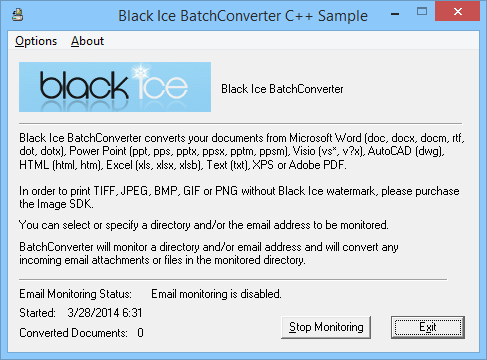
The Black Ice OEM Printer Driver API/RTK (Resource Toolkit) includes a Batch Converter Sample to the printer driver written in C++ enabling developers to monitor/batch convert a specified directory and/or email address and automatically convert any files in the specified directory or incoming emails.
>> Click Here to see the file formats which the Batch Converter can convert
| File Format |
Extension |
| Microsoft Word |
.doc, .docx, .docm, .dot, .dotx |
| Microsoft Excel |
.xls, .xlsx, .xlsm, .xlsb |
| Microsoft PowerPoint |
.ppt, .pptx, .pps, .ppsx, .ppsm, .pptm |
| Microsoft Publisher |
.pub |
| Microsoft Visio |
.vst, .vsd, .vss, .vtx, .vdx, .vsx |
| Adobe Reader |
.pdf |
| Image formats |
.png, .jpg, .jpeg, .gif, .bmp |
| Tagged Interchange File Format |
.tiff (fax compatible formats too) |
| Microsoft text files |
.txt, .rtf |
| Comma-Separated Variables |
.csv |
| XML Paper Specification |
.xps |
| Autocad |
.dwg |
| Hypertext Markup Language |
.htm, .html |
| And More... |
The following sample and *source code are included in the
Resource Toolkit/API.
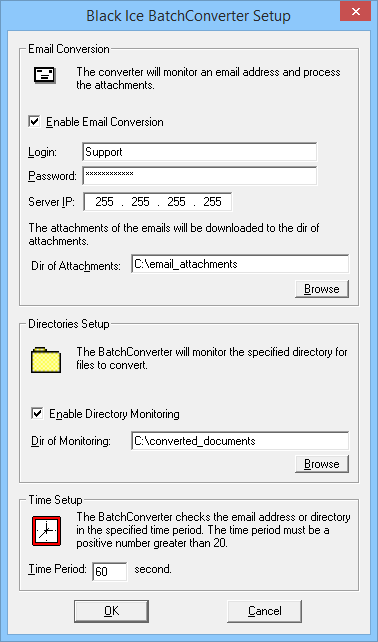
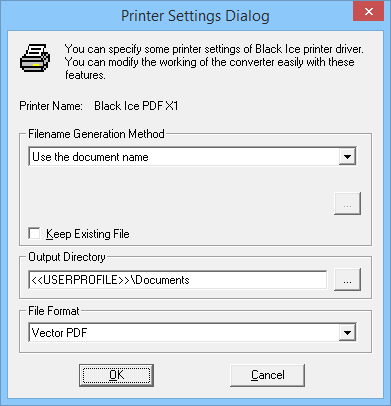
Developers can specify a directory for the Batch converter to monitor/convert. Any supported file placed in the directory will be automatically converted into an image file by printing that file to the Black Ice printer driver. Settings such as the generated file format and output directory can be changed from within the sample as well.
The Batch Converter sample application logs in to a specified POP3 email address then retrieves the emails from a given user account. The attachments of the emails (Word, Excel, HTML, text files, etc.) will be printed to the Black Ice printer driver which will result in converting the received documents into images (JPEG, PDF, TIFF, BMP, etc.).
Developers can modify this sample later on to fit their exact needs by adding additional features. The source code for this sample is included in the “\Sample Source Files\Sample Source Codes\C++\BatchConverter” folder of the RTK installation.
*The source code is not available in DEMO API/Resource Toolkit. For the source code and for the Release version of the Printer Driver RTK/API contact Black Ice Sales at (603) 882-7711 Ext. 2 or sales@blackice.com
 Buy Now
 Download