
Line Removal
The Line Removal is used with faxed or scanned documents. Faxed documents often contain annoying horizontal lines due to communication noise on the telephone line. By utilizing the Line Removal functionality of IceViewer HTML5, these lines can automatically be removed from faxed documents. Scanned documents in some cases, also have horizontal or vertical lines due to the banding or folding of papers.
To use the remove horizontal lines option, please navigate to the Tools toolbar and click on the Remove horizontal lines option.
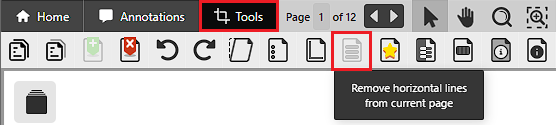
In the Select Pages window, the user can choose which pages IceViewer HTML5 should remove horizontal lines from.
.png)
The following options are available:
- Current page only – Horizontal lines will be removed only from the currently viewed page.
- All pages – Horizontal lines will be removed only from every page.
-
Selected Pages – The user can select the pages the horizontal lines should be removed from by entering the page numbers into the Selected Pages field.
Limitations:
NOTE: Line Removal feature is only available for Monochrome (1 bit) and 8 bit grayscale documents.