 Buy Now
 Download
Redirect printing provides the user with the ability to print to the Black Ice Printer Driver and simultaneously redirect printing to one or more additional printers. If printer redirection is enabled, any document printed to the printer driver will be created into the specified output format, and the original document will be passed through the redirected printer(s). This provides the opportunity to print to a physical printer at the same time that the Black Ice Printer is generating an output file.
It is possible to select any available printer to redirect the printing to, including shared printers on the network. The Black Ice Printer Driver can also be forced to use the settings of the redirected printer such as Resolution, Paper size, Physical paper margins, etc.. This simple but powerful option guaranties that the redirected printing is identical to the image created by the Black Ice Printer Driver.
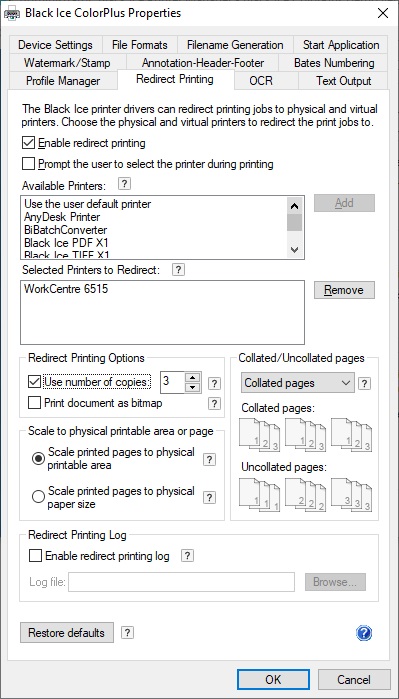
Available options for the redirect printing:
Enable Redirect Printing - The Enable redirect printing checkbox enables or disables the redirect printing feature to one or more printers.
Prompt the user the select the printer during printing - Users can select a single or multiple printers for redirection during printing. If only a single printer is selected in Printing Preferences > Redirect Printing tab, the dialog will not show up during printing. The Printer Driver will redirect the print job silently.
Available Printers - The Available Printers list contains the printers that can be selected as redirect printers. These printers are the locally installed printers on the PC, and the shared printers through the network. Select a printer and click ‘Add’ to add it to the redirected printers list.
Selected Printers to Redirect - The Selected Printers to Redirect list contains the printers that have been selected as redirect printers. These printers aren’t listed in the Available Printers list. To remove a redirected printer, select the printer and click ‘Remove’. Label printers can also be specified as redirect printers. Black Ice printer drivers can handle certain special paper sizes required by label printers.
Redirect Printing Options
Use Number of copies
If Use number of copies enabled, the Printer Driver will ignore the number of copies in the printing application and send the number of copies specified in the Printer Drivers settings under Redirect Printing tab to the specified redirect printers.
Collated/Uncollated
If Use number of copies enabled, the Printer Driver will ignore the Collated/Uncollated settings from the printing application, and use the setting specified in the Printer Driver.
Collated printing will print page documents after each other in proper order, while uncollated printing will print the first page copies, then the second page copies, and so on, as on the explanation diagram below.
Scale to physical printable area or page
Scale to printable area option scales the printed page down by the size of the physical margin of the target printer.
Scale to physical page size option scales the printed page to the physical size of the page, ignoring the target printer’s physical margins.
Redirect Printing Log
Enable redirect printing log - Enables or disables log file generation specifically for redirect printing. File name and location can be specified.
Additional information
The Black Ice Printer Drivers can also place Bates Numbering, Annotation-Header-Footer and Watermark on both the output and redirected output.
Redirect printing is available for all Black Ice printer drivers.
Read more about the Black Ice Printer Driver RTK features for the Redirect Printing.