Buy Now
 Download
Impact Fax Server adds a significant component to the PC based unified messaging systems by integrating fax and email into a single unified platform. The Impact Fax Server allows users to send and receive faxes through a local or wide area network. Additionally, the Impact Fax Server allows users to send and receive faxes from anywhere in the world by using either the Impact Fax Server remote web interface or Email to Fax functionality.
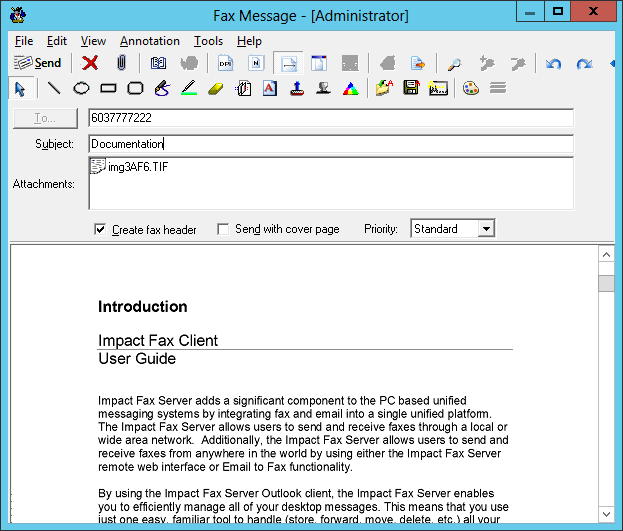
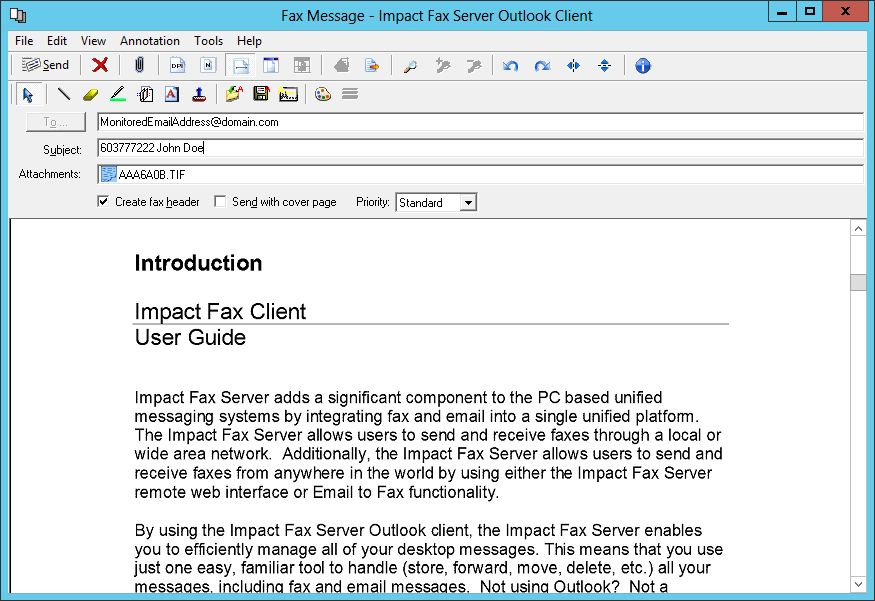
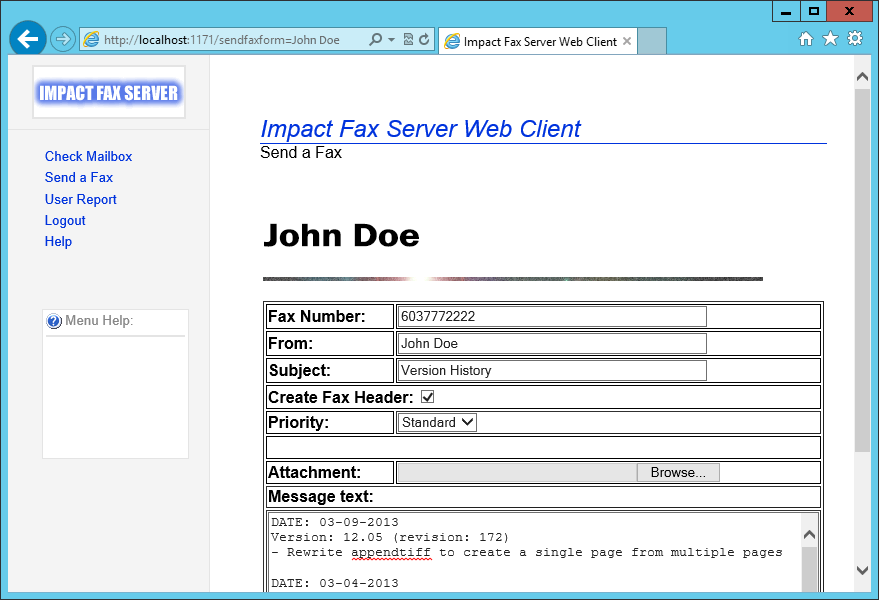
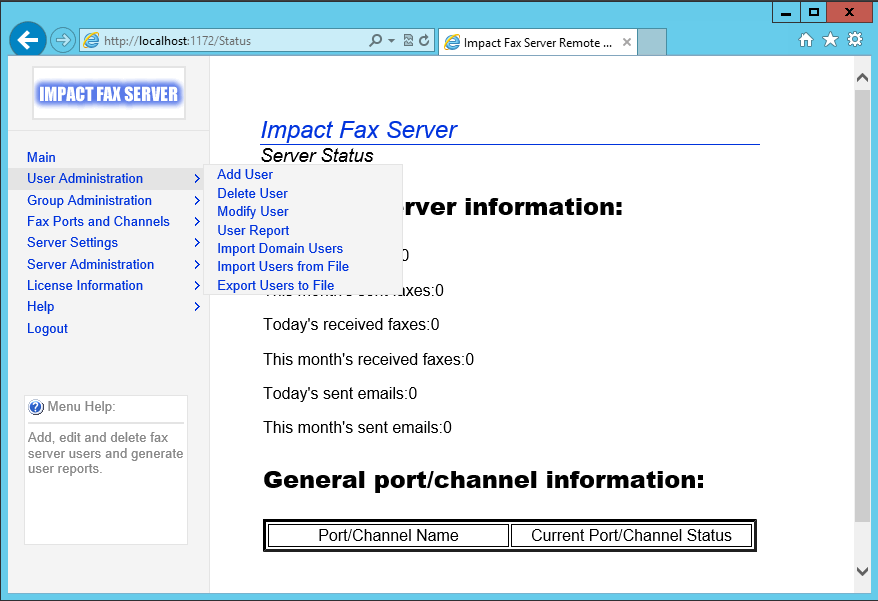
- Impact Fax Server Outlook Client - for Microsoft Outlook integration
- Impact Fax Server's Email to Fax - send and receive faxes through e-mail
- Impact Fax Server Web Client - send and receive faxes with any web browser
- Impact Fax Server Stand Alone Client - fax through a separate application
- Unified messaging reduces desktop chaos created by numerous converging messaging systems. Impact Fax Server integrates seamlessly with Microsoft Outlook providing a single familiar interface
- Protect your investment in staff training and in existing software by using familiar application interfaces. Impact Fax Server makes faxing as easy as sending or receiving e-mail
- No Administrator needed, reduce maintenance through advanced remote administration
- Fax enable your entire office/organization
- Any Class 1, Class 1.0, Class 2, Class 2.0 fax modems, Brooktrout, Dialogic, Eicon, GammaLink and Natural Micro Systems boards.[supported fax hardware]
- Compatible with hundreds of hardware based modems* such as Boca, Hayes, Zoom, US Robotics, Multi-Tech, Motorola, Apache, Mainpine, etc
By using the Impact Fax Server Outlook client, the Impact Fax Server enables you to efficiently manage all of your desktop messages. This means that you use just one easy, familiar tool to handle (store, forward, move, delete, etc.) all your messages, including fax and email messages. Not using Outlook? Not a problem, you can also send and receive faxes using any email client, web browser or the Impact Fax Server Stand Alone Client.
The Impact Fax Server is completely scaleable to meet the needs of organizations of all sizes, and supports up to 255 ports or channels. The Impact Fax Server is compatible with all of the major vendor's fax hardware such as Dialogic, GammaLink, and Brooktrout Boards. The Impact Fax Server is also compatible with any Class 1, Class 1.0, Class 2, Class 2.0 modems.
The Impact Fax Server includes 4 separate client interface options:
For a complete list of the Impact Fax Server features, please visit the Impact Fax Server Features page.
Benefits:
Impact Fax Server
Windows 11 (64 bit)
Windows 10 (32 and 64 bit)
Windows 8.1 (32 and 64 bit)
Windows 7 (32 and 64 bit)
Windows Server 2022
Windows Server 2019
Windows Server 2016
Windows Server 2012 R2 (64 bit)
Citrix*
VMware Horizon + ThinApp, VMware VCenter
Microsoft RemoteApp, Microsoft Hyper-V, Hyper-V VDI
Impact Fax Clients
Windows 11 (64 bit)
Windows 10 (32 and 64 bit)
Windows 8.1 (32 and 64 bit)
Windows 7 (32 and 64 bit)
Windows Server 2022
Windows Server 2019
Windows Server 2016
Windows Server 2012 R2 (64 bit)
Citrix
VMware Horizon + ThinApp, VMware VCenter
Microsoft RemoteApp, Microsoft Hyper-V, Hyper-V VDI
* Microsoft Outlook for use with the Impact Fax Server Outlook Client
Hardware Requirements
* "Soft" or "Win" Modems are not supported.
- Send and receive faxes from anywhere in the world
- Email to Fax Feature
- Receive Faxes as PDF or TIFF images in Outlook
- Send PDF & MS Office attachment with your Fax
- Archiving Received Faxes in PDF Format
- Vonage phone service and hardware compatible
- Android / iPhone / Blackberry / Windows mobile compatible
- No web server installation needed
- Advanced remote administration
- E-mail Confirmation of Fax Messages
- SMS notification for received faxes
- 33.6K (V.34) Faxing - send and receive faxes at speeds up to 33.6K, allowing fax transmissions at up to twice the speed of a standard fax
- Remote Administration - new dynamic menu structure, layout, and integrated help
- Fax confirmation - When a fax is received by the Impact Fax Server, it can automatically send a confirmation fax to the sender to let them know the fax was correctly received
- Assign fax ports to a user - all faxes received on a port can be sent to a specific user
- Automatic fax hardware testing - detect installed fax hardware and check for dial tones
- Globally change port settings - change port settings for multiple ports at once
- Fax Priority - fax priority system allows faxes to be prioritized by the system administrator. Priority ranges can be assigned to different groups and users
- Delete and sort queued faxes - queued faxes can be removed and sorted
- Wide variety of supported fax hardware - Brooktrout, Dialogic and GammaLink Fax Boards, as well as any Class 1, Class 2, and Class 2.0 fax modem are all supported. Analog, DID, Digital T-1, E-1 and ISDN lines are all supported
- Active monitoring and reporting - Impact Fax Server can send periodic e-mails or fax notifications on a system failure or containing system status information
- Automatically print received faxes - option to print every incoming fax to a specified printer
- Generate user statistics - generate user specific reports including number of faxes sent, cost and fax transmission time
Impact Fax Server Key Features
Send Color or black & white faxes...or both!
Impact Fax Server can send and receive color or black & white faxes. When sending a color fax, Impact Fax Server can automatically detect the receiving end's fax capabilities and if the recipient cannot receive a color fax Impact Fax Server will automatically convert the color file into black & white to send to the recipient.
Automatic fax delivery/inbound fax routing/email delivery
Impact Fax Server can automatically route incoming faxes to a user's mailbox or to a particular printer based on a DID or DTMF number or the line which the fax was received on. Faxes can also be forwarded to one or more users or one or more groups, can be automatically printed to a network printer, stored in a specific folder, or delivered to one or more email addresses.
Send faxes from any application
With Impact Fax Server, users can send any file as a fax by simply printing the file to the Impact Fax Server printer, or can create a new message from one of the Impact Fax Server clients or any email client. Users can then select one or more fax recipient(s) from their Outlook Contacts or can manually enter fax numbers.
Receive faxes in TIFF or PDF format
Impact Fax Server can deliver incoming faxes to user’s as TIFF or PDF format. Users can view received faxes from any of the Impact Fax clients, including the Impact Fax Web Client, or can have received faxes forwarded to an email address.
Active Directory integration reduces administration
Impact Fax Server integrates with Active Directory and can import existing Active Directory users, eliminating the need to manually add and configure user accounts.
Supports multiple mail servers
Unlike many fax servers on the market, Impact Fax Server does not require Microsoft Exchange or any specific email server. Impact Fax Server can send and receive faxes for users on different mail servers. Impact Fax Server does not require any software to be installed on the mail server.
Robust & scalable multi-line fax server
Impact Fax Server is a powerful fax server solution which can scale up to 384 lines per fax server using fax boards or multi-port fax modems. For smaller installations, individual fax modems can be used as well. Impact Fax Server supports a wide range of fax hardware, allowing for advanced flexibility. Supported Fax Hardware
Junk fax filtering
Impact Fax Server includes a ‘junk fax filter’ that can auto-delete spam faxes on the basis of incoming fax number and/or identification string.
Allows you to send/receive faxes via your handheld or mobile
Using Impact Fax Server's email to fax and fax to email interface, email clients on handhelds PDAs and Pocket PCs can be used to send and receive faxes.
Supports Outlook Contacts
The Impact Fax Server Outlook Client allows users to send faxes to their existing Outlook contacts by simply choosing the "Business Fax" entry for one or more contacts from Outlook’s Contacts list.
Attach Microsoft Office, PDF, HTML and additional file formats
Impact Fax Server users can attach Microsoft Office, PDF, HTML and additional files to a fax or email form to be faxed. Attached files are converted to faxable format automatically by the Impact Fax Server.
Support for Citrix and Windows Terminal Server
The Impact Fax Server client can run on a Citrix or Windows terminal server, allowing all terminal server users to send and receive faxes from the Citrix or Windows Terminal Server system.
Shared Network Fax Folder
Additional Impact Fax Server Features
Pricing
Impact Fax Server is licensed by the number of Ports/Channels and Users you would like to use with the software, Users which will have access to sending and receiving faxes. Standard packages are shown below, and special licensing can be achieved by adding additional Ports/Channels and/or Users to your license after purchasing. Included with every Impact Fax Server package is 1 (one) Server license for the installation of the Server portion on a single machine.**
Impact Fax Server Pricing
| Number of Fax Ports/Channels | Number of users | Impact Fax ServerHome/Small Office | Yearly Maintenance (Optional) | Impact Fax Server Enterprise |
| 1 | 5 | $299.99 | $74.99 | N/A |
| 2 | 10 | $399.99 | $99.99 | N/A |
| 4 | 25 | $599.99 | $149.99 | N/A |
| 4 | 50 | N/A | $199.99 | $999 |
Additional configurations available, please call or email for details.
Impact Fax Server Version Upgrade Pricing
Using an outdated version of Impact Fax Server? Upgrade today and receive the pricing below! Upgrade discounts are based on your original purchase date.
| Number of Fax Ports/Users | Original Price | Less than 1 year (50%) | 1 year or more (25%) |
| 1p / 5u | $299.99 | $149.99 | $224.99 |
| 2p / 10u | $399.99 | $199.99 | $299.99 |
| 4p / 25u | $599.99 | $299.99 | $449.99 |
Impact Fax Server Add-on Pricing
Add more users to your current license. Additional discounts given at checkout!
| Additional User Packs | Original Price | Add-one price |
| 5 | $299.99 | $199.99 |
| 10 | $399.99 | $299.99 |
| 25 | $599.99 | $399.99 |
| Additional Ports | Original Price | Add-one price |
| 1 | $299.99 | $100.00 |
| 2 | $399.99 | $200.00 |
| 4 | $599.99 | $400.00 |
Impact Fax Server is priced based on the number of fax ports/channels that will be used, as well as the number of users/mailboxes. For analog fax devices, each fax port/channel is equivalent to a phone line. For digital fax devices, a T1 line is equivalent to 24 fax ports/channels, and E1 line is equivalent to 30 fax ports/channels.
*Yearly Maintenance Subscription
The yearly Maintenance Subscription covers your Impact Fax Server license for a year after your purchase date, and provides unlimited FREE upgrades during the year, as well as priority email technical support for the year. Maintenance is optional, even at the time of purchase, but is highly recommended. Purchases of Impact Fax Server include 30 days of maintenance, which includes technical support and any upgrades (major and minor) released during that time period. You can convert those 30 days into a renewable annual maintenance contract by checking the maintenance subscription section in the Online Store. Protect your purchase and keep your software up to date!
To purchase via our Sales Office, complete and fax our End User License Agreement to 561-757-4109.
Looking for a hardware/software bundle? Black Ice Software can supply you with hardware/software bundles as well as complete, turnkey solutions. Call or email for details.
* Prices subject to change without notice
Black Ice Software, LLC
950 Peninsula Corp Circle Suite 2017
Boca Raton, FL 33487
Tel: 561-757-4107
Fax: 561-757-4109
E-Mail: sales@blackice.com
Impact Fax Server Hardware Compatibility
Fax Hardware Installation Guide
Choosing the right fax hardware
Hardware/Software bundles and Turnkey solutions are available! Contact us for details
| Cantata/Brooktrout | Dialogic/GammaLink | Natural Microsystems |
| Eicon | Commetrex | MainPine |
| Comtrol | Perle | Fax Modems |
Cantata (Brooktrout) Technology *
|
Board |
Ports |
Type/Interface |
|
TR1034 Digital |
up to 30 ports |
digital; PRI; MVIP |
|
TR1034 Analog |
up to 8 ports |
analog |
Dialogic/GammaLink - Supports any fax board compatible with the Dialogic System Release 5.1.1
|
Board |
Ports |
Type/Interface |
|
VFX/40ESC |
4 port fax and voice |
analog |
|
VFX/40ESC PLUS |
4 port fax and voice |
analog |
|
VFX/40SC |
4 port fax and voice |
analog |
|
VFX/PCI |
4 port fax and voice |
analog |
|
D/41JCT-LS |
up to 4 ports fax and voice |
|
|
D/120JCT-LS |
up to 12 ports fax and voice |
|
|
D/240JCT-T1 |
up to 24 ports fax and voice |
digital |
|
D/300JCT-E1 |
up to 30 ports fax and voice |
digital |
|
D/600JCT-1E1 |
up to 30 ports fax and voice |
digital |
|
D/600JCT-2E1 |
up to 60 ports fax and voice |
digital |
|
GammaLink CP |
1 |
analog |
|
GammaLink CPi |
1 |
analog |
|
GammaLink CPi 100 |
1 |
analog |
|
GammaLink CPi 120 |
1 |
analog |
|
GammaLink CPi 200 |
2 |
analog |
|
GammaLink CPi 200-PCI |
2 |
analog |
|
GammaLink CPi/200 BRI |
2 (1 BRI connection/2 fax channels) |
digital; BRI ISDN |
|
GammaLink CPi/400 |
4 |
digital |
|
GammaLink CPi/400-BRI |
4 (2 BRI connections/4 fax channels) |
digital; BRI ISDN |
|
GammaLink CPi/400-PCI |
4 |
digita |
|
GammaLink CPi/2400CT-T1 |
24 |
digital |
|
GammaLink CPi/2400-1T1-PCI |
24 |
digital |
|
GammaLink CPi/3000-1E1-PCI |
30 |
digital |
|
GammaLink XPi |
1 |
analog |
|
GammaLink CPD |
1 |
analog |
|
GammaLink CPD 220 |
4 (2 port DID and 2 loop start) |
analog |
|
GammaLink CP4/LSI Series II |
4 |
analog |
|
GammaLink MLCP-AEB (CP4/T1) |
4 |
|
Natural MicroSystems *
|
Board |
Ports |
Type/Interface |
|
AG-8 |
8 ports |
analog |
|
AG-8/DID |
8 ports |
analog |
|
AG-80 |
8 ports |
analog |
|
AG-T1 |
24 ports |
digital |
|
AG-E1 |
30 ports |
digital |
|
AG Dual T |
48 ports |
digital |
|
AG Dual E |
60 ports |
digital |
|
AG Quad T |
96 ports |
digital |
|
AG Quad E |
120 ports |
digital |
|
AG 2000 Series |
8 ports |
analog |
|
AG 4000 Series |
Single, Dual, and Quad T1 or E1 |
digital |
PLEASE NOTE: Some of the older NMS boards may not be able to fax on all channels at the same time due to DSP limitations
Eicon
|
Board |
Ports |
Type/Interface |
|
Diva Server PRI/T1-8 |
8 ports |
digital |
|
Diva Server PRI/T1-24 |
24 ports |
digital |
|
Diva Server Analog 4 Port |
4 ports |
analog |
|
Diva Server Analog 8 Port |
8 ports |
analog |
Commetrex
|
Board |
Ports |
Type/Interface |
|
M-4 |
4 port |
analog |
|
M-8 |
8 port |
analog |
|
M-T1 |
24 port |
digital |
Multi-port Modems
Mainpine Ltd (Supports V.34 Faxing)
|
Board |
Ports |
Interface |
|
RockForce Duo |
2 |
PCI slot |
|
RockForce Quatro |
4 |
PCI slot |
|
RockForce Octo |
8 |
PCI slot |
Comtrol
|
Board |
Ports |
Interface |
|
RocketModem II PCI 4 |
4 |
PCI slot |
|
RocketModem II PCI 6 |
6 |
PCI slot |
|
RocketModem III PCI 4 |
4 |
PCI slot |
|
RocketModem III PCI 8 |
8 |
PCI slot |
Perle
|
Board |
Ports |
Interface |
|
V.92 PCI-RAS |
4 |
PCI slot |
|
V.92 PCI-RAS |
8 |
PCI slot |
Class 1 Modems
Any class 1 modems such as Hayes, USRobotics, Multitech, Boca Research, Zoom, ZyXel, Apache, Motorola, and more.
* The USR Robotics Model 5637 is not supported.
Class 1.0 Modems (V.34)
Any class 1.0 modems
Class 2 Modems
Any class 2 modems.
Class 2.0 Modems
Any class 2.0 modems such as Hayes, USRobotics, Multitech, Boca Research, Zoom, ZyXel, Apache, Motorola, and more.
Note on Modems: We do not support "winmodems" or "softmodems". These are modems that are driver based and do not contain a real chipset. They are usually given away with Desktop systems and are always included in Laptops. These modems provide very sporadic performance and were not intended for business use.
* The USR Robotics Model 5637 is not supported.
- Check with your Dialogic reseller to ensure that Fax resources are included on your board
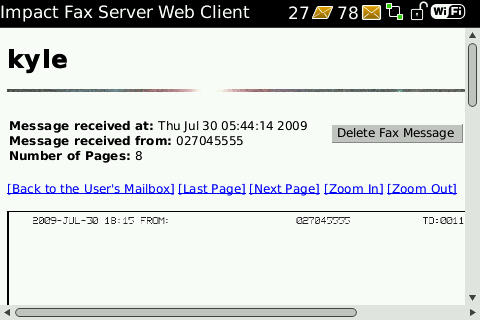
- 1. Open the Web Browser
- 2. Go to http://YourServerIP:1171 or http://YourServer.YourDomain.com:1171
- 3. Enter the Account Name and Password
- 4. Click the Time and Date of the fax you want to view
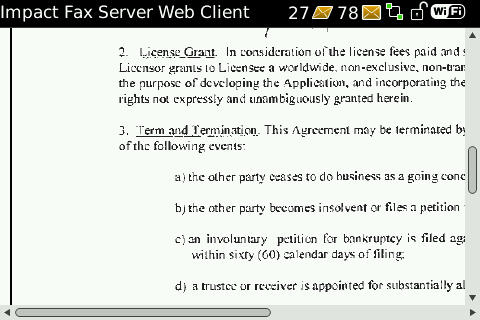
- 5. View the entire fax page by page!
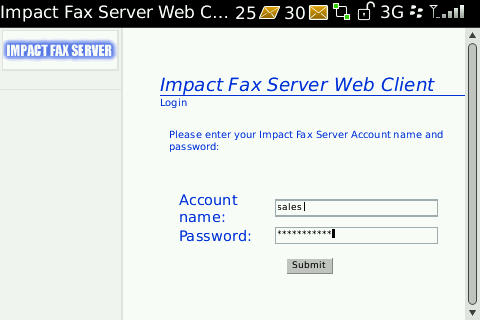
- 1. Open the Web Browser
- 2. Go to http://YourServerIP:1171 or http://YourServer.YourDomain.com:1171
- 3. Enter the Account Name and Password
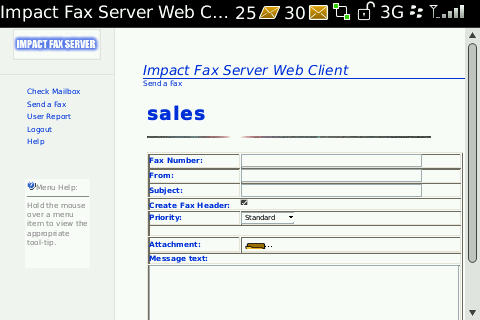
- 4. Click 'Send a Fax'
- 5. Enter the Fax Number (and additional info if you wish)
- 6. Click the 'Browse' icon to select a document to send as a fax
- 7. Click Send, and you're done!
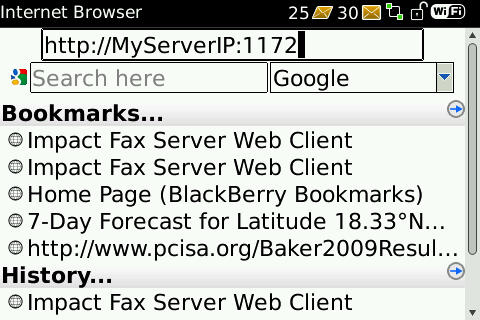
- 1. Open the Web Browser
- 2. Go to http://YourServerIP:1172 or http://YourServer.YourDomain.com:1172
- 3. Enter the Administrator password
- 4. Administrate your Server!
Fax Server for BlackBerry®
Administrate your Fax Server, view Received faxes, and Send Faxes, all from your BlackBerry®!
 View a Received Fax
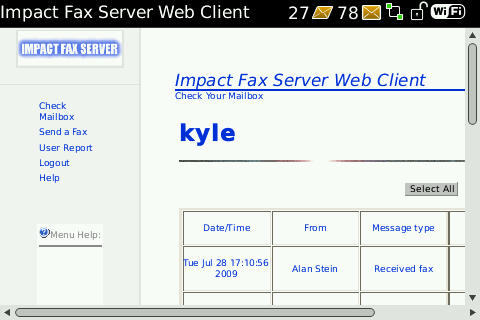
You can view your received faxes anytime through the Browser on your BlackBerry®. Log in to the Web Client to view all your received faxes, or set up Fax to Email and receive PDF attachments of incoming faxes to your email!
To access the Web Client and View a Fax:
 Send a Fax
The Impact Fax Server Web Client allows you to both view receive faxes, or send a fax. Accessing the Web Client from your BlackBerry® allows you to send a fax any time, anywhere!
To access the Web Client and Send a Fax:
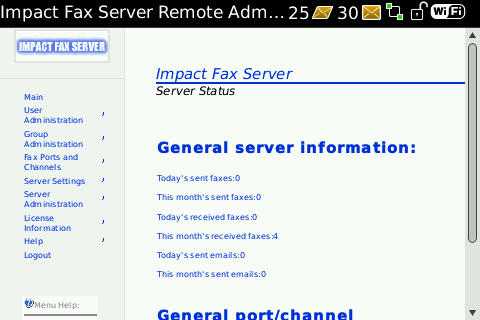
 Configure and Administrate your Fax Server
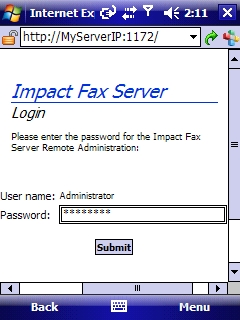
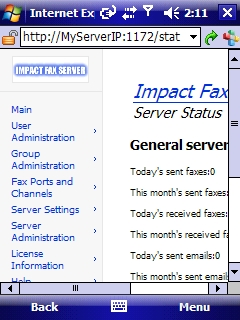
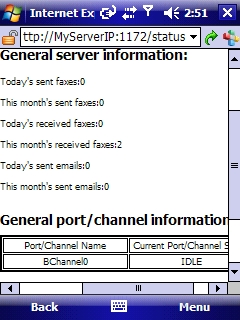
You can access your Fax Server Administration page from the web browser of your BlackBerry®. From the Administration page, you can Add, Delete, or Modify Users and Groups, Open or Close Ports, Configure Server Settings, Monitor your server, Stop or Restart the server, and more!
To access the Fax Server Administration:
The BlackBerry® and RIM families of related marks, images and symbols are the exclusive properties of and trademarks or registered trademarks of Research In Motion Limited.
- 1. Open the Web Browser
- 2. Go to http://YourServerIP:1171 or http://YourServer.YourDomain.com:1171
- 3. Enter the Account Name and Password
- 4. Click the Time and Date of the fax you want to view
- 5. View the entire fax page by page!
- 1. Open the Web Browser
- 2. Go to http://YourServerIP:1172 or http://YourServer.YourDomain.com:1172
- 3. Enter the Administrator password
- 4. Administrate your Server!
Fax Server for iPhone
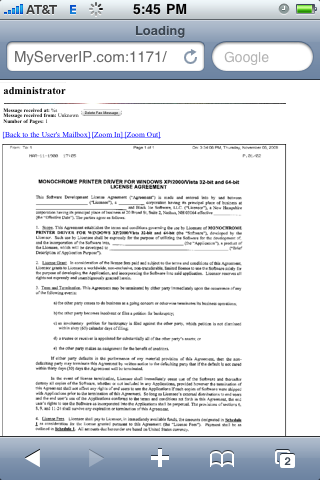
Administrate your Fax Server and view Received faxes from your iPhone!
 View a Received Fax*
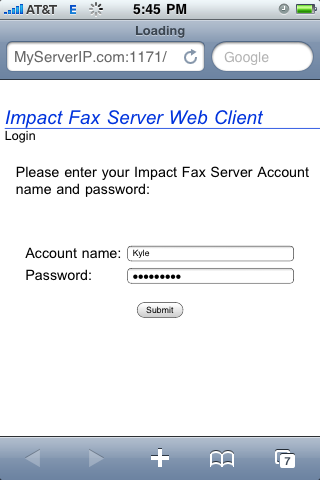
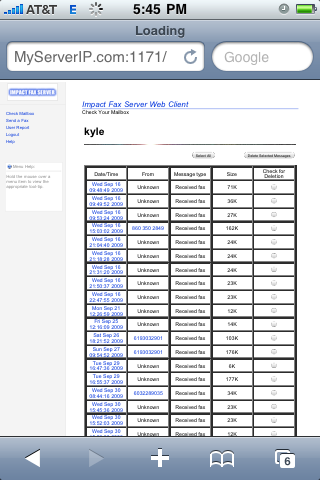
You can view your received faxes anytime through the Browser on your iPhone. Log in to the Web Client to view all your received faxes, or set up Fax to Email and receive PDF attachments of incoming faxes to your email!
To access the Web Client and View a Fax:
Configure and Administrate your Fax Server
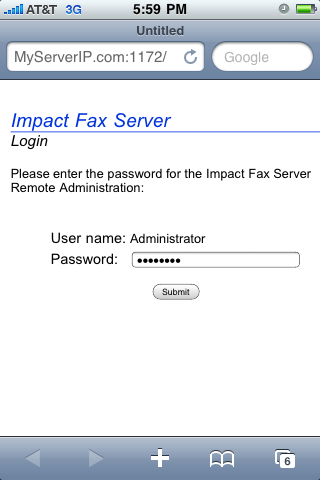
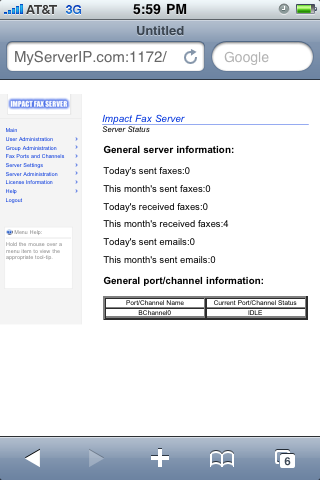
You can access your Fax Server Administration page from the web browser of your iPhone. From the Administration page, you can Add, Delete, or Modify Users and Groups, Open or Close Ports, Configure Server Settings, Monitor your server, Stop or Restart the server, and more!
To access the Fax Server Administration:
iPhone is a trademark of Apple Inc.
- 1. Open the Web Browser
- 2. Go to http://YourServerIP:1171 or http://YourServer.YourDomain.com:1171
- 3. Enter the Account Name and Password
- 4. Click the Time and Date of the fax you want to view
- 5. View the entire fax page by page!
- 1. Open the Web Browser
- 2. Go to http://YourServerIP:1171 or http://YourServer.YourDomain.com:1171
- 3. Enter the Account Name and Password
- 4. Click 'Send a Fax'
- 5. Enter the Fax Number (and additional info if you wish)
- 6. Click the 'Browse' icon to select a document to send as a fax
- 7. Click Send, and you're done!
- 1. Open the Web Browser
- 2. Go to http://YourServerIP:1172 or http://YourServer.YourDomain.com:1172
- 3. Enter the Administrator password
- 4. Administrate your Server!
Fax Server for Windows Mobile
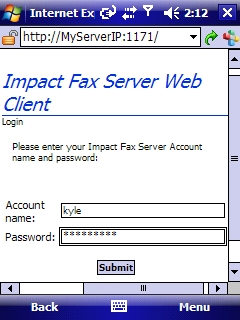
Administrate your Fax Server, view Received faxes, and send faxes, all from your Windows Mobile device!
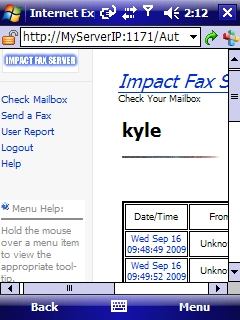
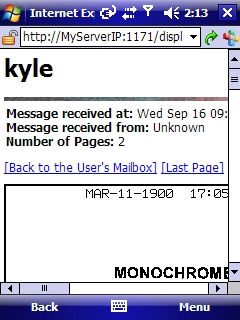
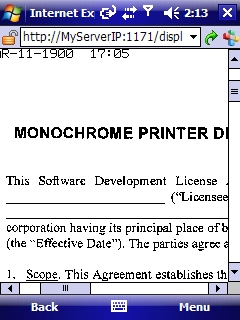
 View a Received Fax*
You can view your received faxes anytime through the Browser on your Windows Mobile device. Log in to the Web Client to view all your received faxes, or set up Fax to Email and receive PDF attachments of incoming faxes to your email!
To access the Web Client and View a Fax:
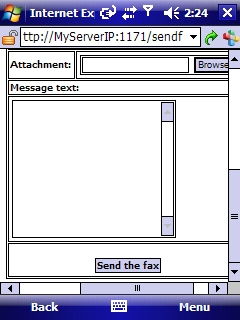
 Send a Fax
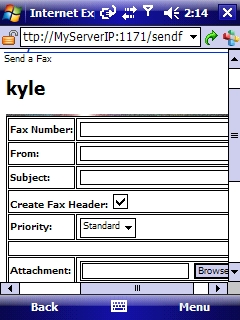
The Impact Fax Server Web Client allows you to both view receive faxes, or send a fax. Accessing the Web Client from your Windows Mobile device allows you to send a fax any time, anywhere!
To access the Web Client and Send a Fax:
Configure and Administrate your Fax Server
You can access your Fax Server Administration page from the web browser of your Windows Mobile device. From the Administration page, you can Add, Delete, or Modify Users and Groups, Open or Close Ports, Configure Server Settings, Monitor your server, Stop or Restart the server, and more!
To access the Fax Server Administration: