Email to Fax Client
Impact
Fax Server |
|
 |


Want to send and receive faxes via your email? With Impact Fax
Server it’s easy!
The Impact
Fax Server can be configured as an Email to Fax Server. This means
that the Impact Fax Server has the capability to retrieve e-mail
messages from a dedicated e-mail address, convert it to a fax and
send it. The sender of the email will receive an e-mail notification
giving the result of the faxing transmission.
The Impact Fax
Server's Email to Fax functionality allows users to send a fax from
anywhere in the world, using any email client or email provider.
To use the Impact Fax Server as an
“Email to Fax Server” you will need the following:
-
A POP3
server that hosts a dedicated e-mail address:
The Impact Fax Server will periodically retrieve all the
e-mails sent to this address and will convert them to faxes
and send them out.
-
An SMTP
Server:
The Impact Fax Server will use the SMTP Server to send
confirmation e-mails to the users.
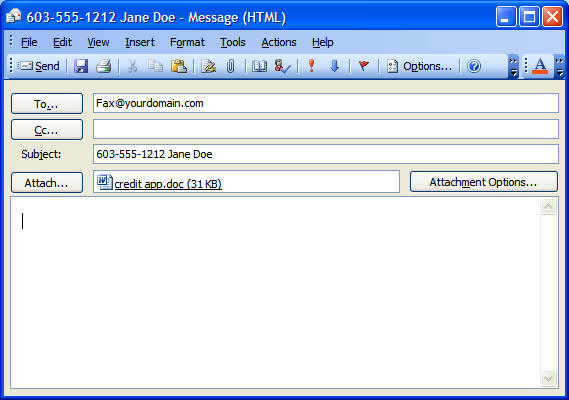
When you want to
fax a document you just attach it to an email and send that email to
your fax server’s email address for example faxserver@yourdomain.com
with the fax number and the name of the recipient in the subject
line.

When you click
“Send” the email will be sent to the Fax Server’s email account.
With the Impact Fax
Server Email to Fax Functionality enabled the Impact Fax Server will
log into the specified email account and download all the messages
that are there. It will then process them converting the
attachments to TIFF files and faxing them to the number specified in
the subject line.
Impact Fax Server
can process the following attachments, TIFF files, PDF files, and MS
Office files and convert them into faxable images.
Once the email has
been processed and the fax has been successfully sent the Impact Fax
Server will respond with a status notification email.
Using the Impact
Fax Server you can specify that you want your faxes delivered as
TIFF or PDF attachments. TIFF is the standard FAX image file format
however with Impact Fax Server 6.0 you can now deliver faxes to your
office staff as PDF files.
Using Microsoft Outlook for your email? Use the
Impact Fax Server Outlook Client and you can use your Outlook
Contacts as your fax phone book and even send faxes to multiple
recipients.

Home >
Faxing Software >
Impact Fax Server
> Fax Clients > Email to Fax
Client |