
Storing documents in an ODBC Data Source
The IceViewer HTML5 has the capability to store the documents in an ODBC data source, pointing to a remote database. This feature allows administrators to connect IceViewer HTML5 to their existing database and open, save, edit documents from the database.
|
What is ODBC? Open Database Connectivity (ODBC) is a standard application programming interface (API) for accessing database management systems. The designers of ODBC aimed to make it independent of database systems and operating systems. An application written using ODBC can be ported to other platforms, both on the client and server side, with few changes to the data access code. In short, ODBC helps you to connect to any type of database easily. |
To store the documents in the ODBC, change IceViewer HTML5 to Store documents in ODBC Data Source.
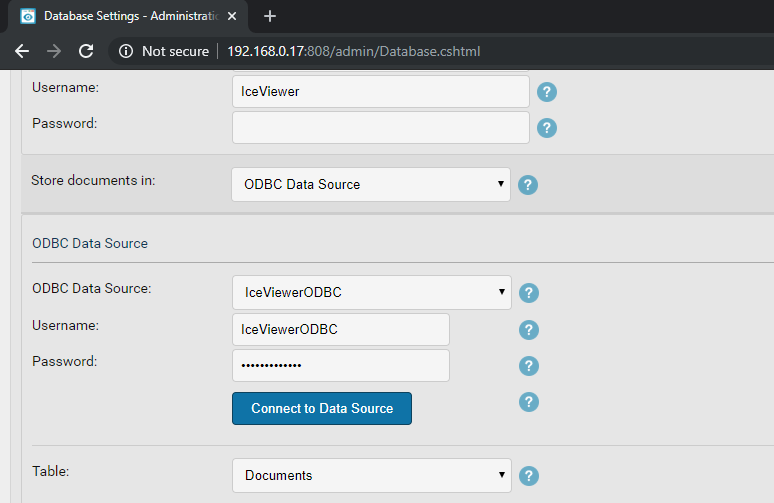
Select the data source from the ODBC Data Source list, and provide a Username and Password to connect to the data source. Click Connect to Data Source to test the connection, and read the tables from the data source.
Select the Table where the documents need to be stored.
When the Table is selected, pair each column to the ODBC from Document ID to Last Modified Date column.
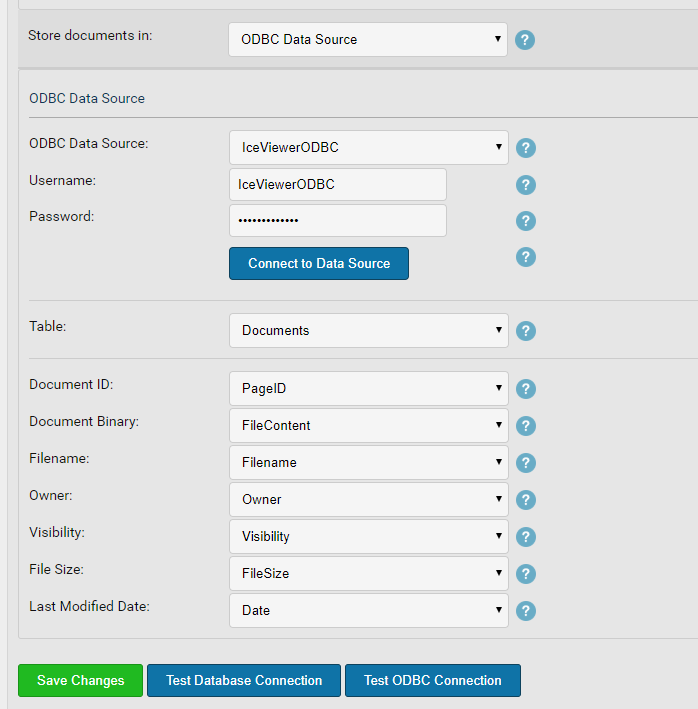
It is required to pair each column in the table, to make sure that IceViewer HTML5 will be able to open, save and edit documents in the ODBC data source. The ODBC data source columns must comply with the following requirements:
| Document ID | Must be a unique identifier integer type with auto incrementation. This field will store a unique identifier to the documents. |
| Document Binary | Must be able to receive BINARY data. (BLOB/VARBINARY) |
| Filename |
Must be able to receive string data. The maximum length must be at least 255. For example nvarchar(255). |
| Owner | |
| Visibility | Must be able to receive integer data. The visibility will be stored as 0 (Private) or 1 (Public). |
| File Size |
Must be able to receive string data. The maximum length must be at least 100. For example nvarchar(100). |
| Last Modified date | Must be able to receive Date. |
Click on Test Database Connection to test the SQL Settings, Click on Test ODBC Connection to test the ODBC settings, and click Save changes to save the database settings.
For storing OCR in an ODBC Data Source, the columns must comply with the following requirements:
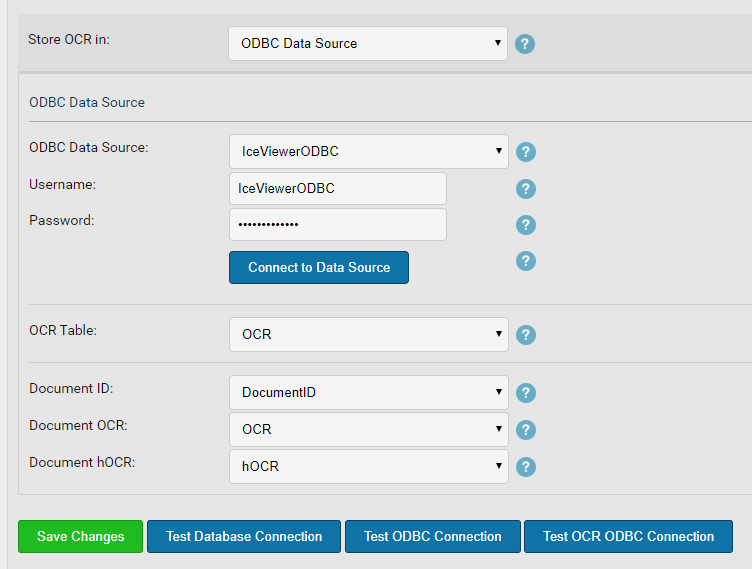
| Document ID | Must be a unique identifier integer type with auto incrementation. This field will store a unique identifier to the documents. |
| Document OCR | Must be able to receive TEXT data, and must support NULL. |
| Document hOCR | Must be able to receive TEXT data, and must support NULL. |