
Uploading files to SharePoint
(Not available in the Free version)
IceViewer Browser Plug-in can upload images and TIFF document files to a SharePoint server.
NOTE: Microsoft SharePoint has certain restrictions applicable to filenames and file size:
- Filename restriction on SharePoint: For SharePoint to consider a file valid, the file or folder names cannot begin or end with a dot, cannot contain consecutive dots and cannot contain any of the following characters: ~ " # % & * : < > ? / \ { | }.
- File Sizes on SharePoint: On most systems SharePoint file size limit is 50 MB by default.
In order to upload files to a SharePoint server from IceViewer Browser Plug-in, follow the steps below:
- Open the TIFF file from the Internet or navigate to a TIFF file using Internet Explorer.
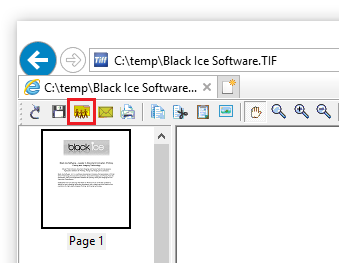
- Click on the Upload to SharePoint toolbar
button on the file menu.
- Input the SharePoint Server name, Directory, Username and
Password.
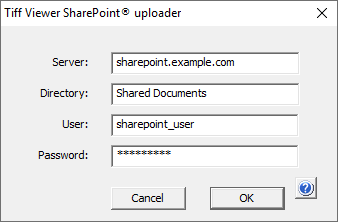
- Press OK to launch the upload process.

- When the upload is finished, the SharePoint Upload dialog disappears.
SharePoint error messages
Unable to connect –Check the SharePoint settings including Server, Directory, Username and Password.
Upload Error –Use a different filename. For SharePoint to consider a file valid, file or folder names cannot begin or end with a dot, cannot contain consecutive dots and cannot contain any of the following characters:
~ " # % & * : < > ? / \ { | }.