 Buy Now
 Download
Writing a PDF417 Barcode
To create a PDF-417 Barcode (must have a DIB open), move to the menu item: PDF-417 --> Write…
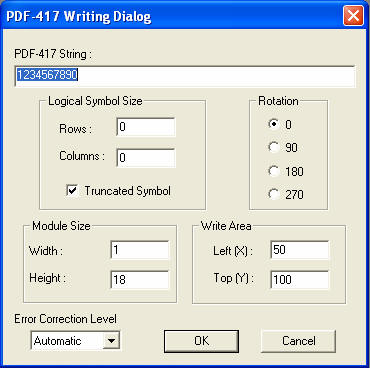
PDF-417 String: Information to be encoded. May contain any ASCII characters.
Rows: Number of Rows of information in the barcode. If left as default, the PDF-417 Barcode SDK/ActiveX will automatically adjust this setting.
Columns: Number of Columns of information in the barcode. If left as default, PDF-417 Barcode SDK/ActiveX will automatically adjust this setting.
Truncated Symbol Size: If left checked, will shorten the necessary length of the barcode.
Rotation: Controls the orientation of the barcode.
Left (X); Top (Y): Specifies the pixel coordinates where the barcode will be placed on the bitmap.
Width; Height: The width and height in pixels of each element in the barcode.
Error Correction Level: Set a specific Error Correction Level here. Default is set to Automatic (recommended).
Reading a PDF417 Barcode
To read a PDF-417 barcode, navigate to the PDF-417 --> Read… menu item.
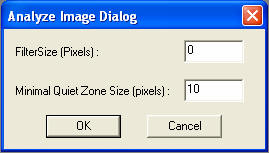
FilterSize: Defines the smallest module size of a barcode that can be read. Any barcodes with a module width or height of lesser value then the FilterSize will not be found.
Minimal Quiet Zone Size: Defines the smallest Quiet Zone Size that will be read. Any barcode with a lesser Quiet Zone will not be found.
Sample Applications:
Operating Systems Supported:
Windows 7/Vista/XP/2000 (32 and 64 bit)
Windows Server 2008 R2/2008/2003/2000 (32 and 64 bit)
Ctrix XenApp (Citrix Presentation Server)/XenDesktop
Looking for more? Check out our New Document Imaging SDK/ActiveX