 Buy Now
 Download
Creating a Linear Barcode
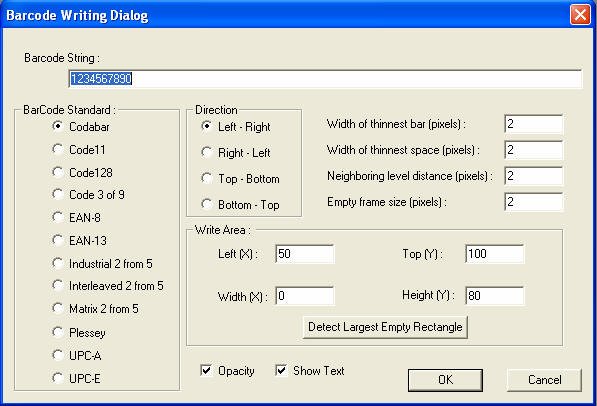
Barcode String: Information to be encoded. The Barcode standard specifies which characters can be entered in this field.
Barcode Standard: Which barcode standard the barcode will be created with.
Direction: Orientation of the barcode.
Width of thinnest bar: Defines in pixels how wide the smallest modules will be
Width of thinnest space: Defines in pixels how wide the smallest white space will be between modules.
Neighboring level distance: Specifies the length of each character’s barcode value.
Empty Frame Size: The amount of white space above the barcode in the given rectangle.
Left (X); Top (Y): Coordinates in pixels that the barcode will be placed on the bitmap.
Width (X); Height (Y): The size in pixels that the barcode will be upon creation.
Detect Largest Empty Rectangle: Finds the largest available area on the open and active bitmap for a barcode to be placed.
Opacity: If checked, this option will cover any information beneath the barcode.
Show Text: Toggles whether the text value of the barcode will be shown or not.
Reading all Linear Barcodes
To read all available 1D barcodes, navigate to: Barcoding --> Detect And Decode All Barcodes
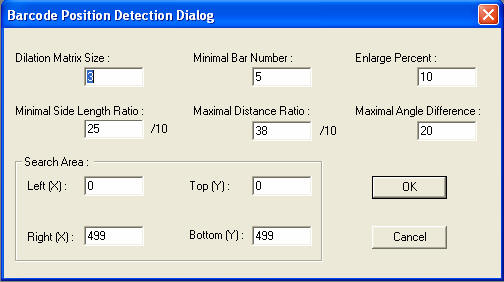
Dilation Matrix Size: May help rectify damaged barcode samples by increasing this number. Dilation may help fill holes or inaccuracies in the barcode.
Minimal Bar Number: Minimum number of lines mandatory in order to detect as a barcode.
Enlarge Percent: The percent of enlargement required to detect and read the barcode.
Minimal Side Length Ratio: Specifies the minimal ratio of longer to shorter in order to recognize the element as a barcode.
Maximal Distance Ratio: How far two barcodes must be apart in order to read them as separate barcodes.
Maximal Angle Difference: The maximum amount that a single barcode may be bent and still be read.
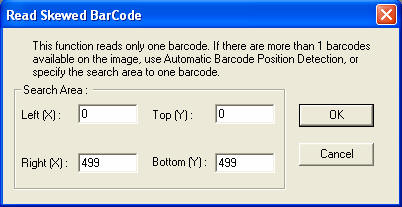
Search Area: Defines the area (left, right, top and bottom of the box) where barcodes will be scanned for.
Detecting the Orientation of One Linear Barcode
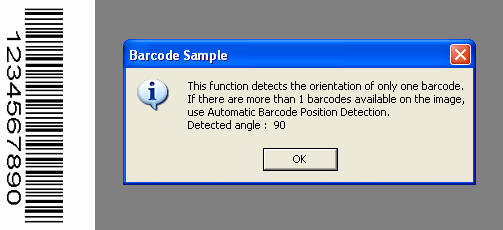
Detecting the Largest Available Area for a New Barcode.
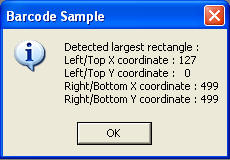
Reading only one barcode by orientation.
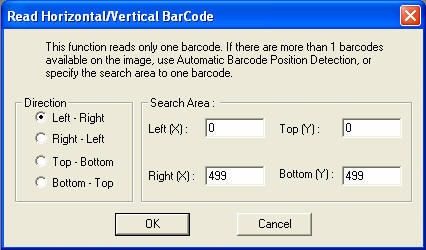
Reading any one first available barcode.
Sample Applications:
Operating Systems Supported:
32-bit Windows Server 2003 family, XP, 2000, NT 4.0 and ME/98/95.
Looking for more? Check out our New Document Imaging SDK/ActiveX