 Buy Now
 Download
Writing a Data Matrix Barcode
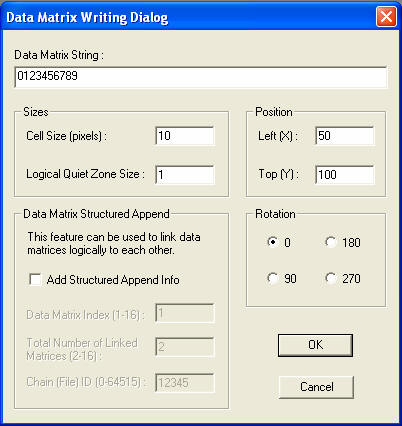
Data Matrix String: Information to be encoded. May contain alpha-numeric data up to 3,116 Digits or 2,335 ASCII characters.
Cell Size: Refers to the height and width in pixels of each segment in the barcode.
Logical Quiet Zone Size: Is the buffer around the barcode. The unit of measurement is specified as the Cell Size above.
Left (X); Top (Y): Specifies the pixel coordinates where the barcode will be placed on the bitmap.
Rotation: Defines the orientation of the barcode.
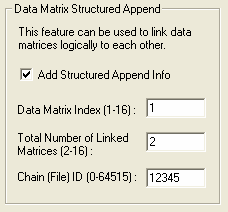
Data Matrix Index: Specifies the ID of the current Barcode and relates directly to the Total Number of Linked Matrices.
Total Number of Linked Matrices: The total end number of matrices to be linked.
Chain (File) ID: Numeric name for the matrix set.
Reading a Data Matrix Barcode
To read a Data Matrix barcode, navigate to the Data Matrix --> Read… menu item.
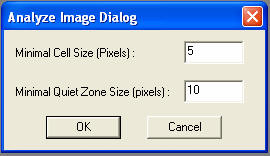
Minimal Cell Size: Should be no less then the smallest Cell Size value of the barcode to be read.
Minimal Quiet Zone Size: Equally cannot be smaller then the smallest Quiet Zone specified during barcode creation.
Sample Applications:
Operating Systems Supported:
32-bit Windows Server 2003 family, XP, 2000, NT 4.0 and ME/98/95.
Looking for more? Check out our New Document Imaging SDK/ActiveX