Download Demo
Printer Driver Pricing Online Mnaual
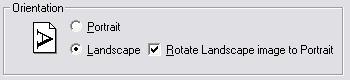
The default page orientation (Portrait or Landscape) can be set on the Device Setting panel as well. If Landscape orientation is selected the driver will report landscape paper orientation to the printing application, but the image on the page will be rotated 90 degrees so that the actual saved image will still be in portrait orientation just like when you print in landscape mode. This makes it possible to fax a page printed in landscape orientation.
You are here:
Home > Printer Drivers > Features > Page Orientation Control
To Top