• Document conversion
  • Development tools
  • Office products
  • Downloads
  • Purchase
  • Support
  • Company
  • Printer Drivers
    • Overview
    • ColorPlus PDF Printer Driver
    • PDF Printer Driver
    • Color Printer Driver
    • Monochrome Printer Driver
    • EMF Printer Driver
  • Communication Toolkits
    • Fax Toolkit
  • Imaging Toolkits
    • TIFF SDK/ActiveX
    • Image SDK/ActiveX
    • Document Imaging SDK/ActiveX
    • Annotation SDK/ActiveX
    • Image PDF SDK/ActiveX
    • Cover Page Generator SDK/ActiveX
  • Barcode Toolkits
    • 1D Barcodes
    • 2D Barcodes
  • Download Demos

Editing PDF Metatags - Black Ice Printer Drivers

Download Demo

Printer Driver Pricing Online Mnaual

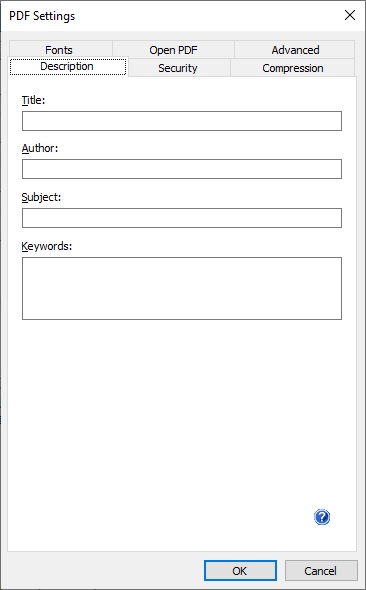
Under the File Format panel, in the PDF settings dialog, you can specify the meta data of the PDF document such as title, author, subject and keywords.

Title: Title of the PDF document.

Author: You can specify the author of the document.

Subject: Short description of the PDF document.

Keywords: Here you can add keywords for your document. Search engines will look for these keywords.

Contact Information
  • Tel: 1.(603).882.7711
  • E-mail: sales@blackice.com
  • About Us
Support
  • Submit technical support request
  • Online Forum
  • Tutorials
Knoweledge base
  • Online Forum
  • Online Manuals
  • Newsletters
  • Tutorials
License Key Request
  • Manual Demo Registration
  • Release Manual Registration
  • License Key Reset

You are here:

Home > Printer Drivers > Features > PDF Metadata

To Top

  • Company About us News Releases References Partners Careers
  • Development tools Printer Drivers Imaging Toolkits Fax Toolkits
  • Office products Fax Software Printing Viewers Documents Conversion Free software
  • © Black Ice Software, LLC 1989-2011 All Rights Reserved
    Legal notices | Privacy policy

    Contact Us: 603-882-7711
    or sales@blackice.com