OEM Printer Drivers
Imaging Toolkits
Automated Printing
End-User Virtual Printer Drivers
Batch Converters
Printing Tools
Document Viewers
HTML5 Viewers
Forms
Print Automation
Impact Fax
Email Automation
Development Tools
Document Converter Printer Drivers, OEM Printer Drivers for Developers, BiLPDManager, Auto-print SDK for Automated Printing Solutions, Imaging Toolkits, Barcode Toolkits
Impact Products
BiBatchConverter, Print2Email, Print2RDP, Print2Desktop, IceViewer editions, FileFlow, Impact Fax Broadcast
Purchase Information
Support
Knowledge
License Key Request
Newsletters
Company
Buy Now Download
Printer Driver Pricing Online Mnaual
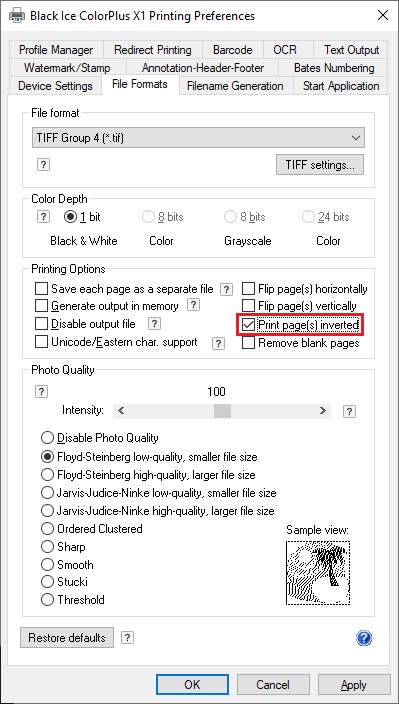
Print page(s) inverted option is available only for monochrome file formats (1 bit color depth) .
Using this feature your documents can be printed in invert. The invert feature is allowed for all monochrome file formats for example TIFF Group 4, Bitmap or GIF. The Invert feature can be set directly in Printing Preferences of ColorPlus driver at File Formats tab (See the image below). Certainly the invert feature is adjustable with BlackIceDEVMODE dll and OCX using the following methods: IsInvertImageEnabled, EnableInvertImage, DisableInvertImage. For more information about the methods please see the resource toolkit manual. The invert page feature can be set at installation time using printer driver’s INI file. For more information see BLF_INVERTIMAGE flag.
You are here:
Home > Licensed ColorPlus Printer Driver for Desktop > Invert Page
 Buy Now
 Download