 Buy Now
 Download
Black Ice Printer Drivers offer a user-friendly way to merge/combine multiple print jobs into a PDF or TIFF file with a preview feature. The User can rearrange the document in the merge window list by moving up or down the document in the list. The Preview Window is an exceptionally useful feature that lets users see and identify the position of the selected document in the Merge Window list to organize the document.
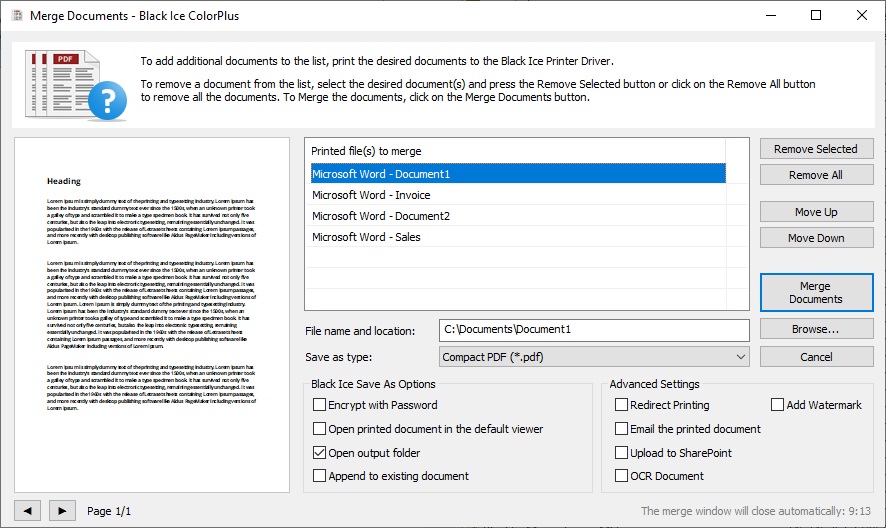
The Merge Documents window is a new unique technology allowing users to easily select which documents need to be merged, and easily configure advanced printing options, such us sending the printed document in emails.
Configuring the printer driver for using the Merge Documents window:
In order to combine multiple printing jobs using the new Merge Documents window, please check the Combine/Merge multiple document into a single file option and select the Merge documents using Merge Documents window option.
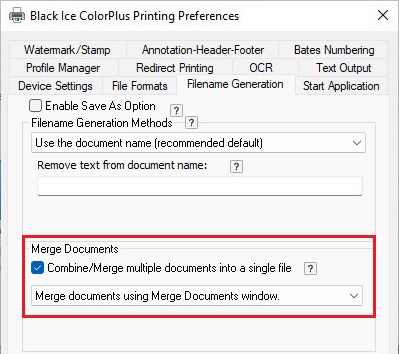
NOTE: The "Enable Save As Option" and the "Save each page as a separate file" options cannot be used while the "Combine/Merge multiple documents into a single file" is enabled.
From now, when printing to the Black Ice Printer Driver, the Merge Documents window comes up and stays open, listing the printed documents.
On the Merge Documents window, one can merge the listed documents by clicking on the Merge Documents button.
File name and location must be the location and the file name of the generated merged document, without the extension. The Printer Driver automatically selects the extension (such as .PDF) based on the selected Save as type. To select the path, one can use the Browse button.
Save as type must be the output file format.
By using the Remove selected and Remove All buttons, one can remove documents from the list to exclude the files from the merging.
To set the order of the documents before merging, select a document in the "Printed file(s) to merge" list, and use the Move Up and Move Down buttons to organize documents.
To identify the documents in the "Printed file(s) to merge" list, one can utilize the Document Preview feature of the Merge window. To use the preview feature, select a document from the list and use the left and right arrows below the preview to navigate between pages.
In the Black Ice Save As Options area, one can select additional options, such as opening the output folder.
In the Advanced Settings area, one can select additional printing options, such as Redirect Printing, Watermark or OCR.