
Error Code 401
Error 401 can happen if the version of the User Interface and Port Monitor DLLs does not match.
The default name and location of these DLLs are the following. Please make sure that the version of the installed DLLs matches.
Desktop - Release:
- c:\Windows\System32\spool\drivers\x64\3\BuMUifNT.dll – Monochrome
- c:\Windows\System32\spool\drivers\x64\BuMUifNT.dll – Only with OEM – Monochrome
- c:\Windows\System32\BuMMonNT.dll – Monochrome
- c:\Windows\System32\spool\drivers\x64\3\BuAUifNT.dll - ColorPlus
- c:\Windows\System32\spool\drivers\x64\BuAUifNT.dll – Only with OEM – ColorPlus
- c:\Windows\System32\BuAMonNT.dll – ColorPlus
- c:\Windows\System32\spool\drivers\x64\3\BuPUifNT.dll - PDF
- c:\Windows\System32\spool\drivers\x64\BuPUifNT.dll – Only with OEM – PDF
- c:\Windows\System32\BuPMonNT.dll – PDF
- c:\Windows\System32\spool\drivers\x64\3\P2EUifNT.dll – Print2Email
- c:\Windows\System32\P2EMonNT.dll – Print2Email
- c:\Windows\System32\spool\drivers\x64\3\BDCUifNT.dll – BiBatchConverter
- c:\Windows\System32\BDCMonNT.dll – BiBatchConverter
Desktop - Demo:
- c:\Windows\System32\spool\drivers\x64\3\BuMUifND.dll – Monochrome
- c:\Windows\System32\spool\drivers\x64\BuMUifND.dll – Only with OEM – Monochrome
- c:\Windows\System32\BuMMonND.dll – Monochrome
- c:\Windows\System32\spool\drivers\x64\3\BuAUifND.dll - ColorPlus
- c:\Windows\System32\spool\drivers\x64\BuAUifND.dll – Only with OEM – ColorPlus
- c:\Windows\System32\BuAMonND.dll – ColorPlus
- c:\Windows\System32\spool\drivers\x64\3\BuPUifND.dll - PDF
- c:\Windows\System32\spool\drivers\x64\BuPUifND.dll – Only with OEM – PDF
- c:\Windows\System32\BuPMonND.dll – PDF
- c:\Windows\System32\spool\drivers\x64\3\P2EUifND.dll – Print2Email
- c:\Windows\System32\P2EMonND.dll – Print2Email
- c:\Windows\System32\spool\drivers\x64\3\BDCUifND.dll – BiBatchConverter
- c:\Windows\System32\BDCMonND.dll – BiBatchConverter
Desktop ARM – Release
- c:\Windows\System32\spool\drivers\x64\3\BuMUifDA.dll - Monochrome – ARM64
- c:\Windows\System32\spool\drivers\x64\BuMUifDA.dll - Only with OEM – Monochrome – ARM64
- c:\Windows\System32\BuMMonDA.dll - Monochrome – ARM64
- c:\Windows\System32\spool\drivers\x64\3\BuAUifDA.dll - ColorPlus – ARM64
- c:\Windows\System32\spool\drivers\x64\BuAUifDA.dll - Only with OEM – ColorPlus – ARM64
- c:\Windows\System32\BuAMonDA.dll - ColorPlus – ARM64
- c:\Windows\System32\spool\drivers\x64\3\BuPUifDA.dll – PDF – ARM64
- c:\Windows\System32\spool\drivers\x64\BuPUifDA.dll - Only with OEM – PDF – ARM64
- c:\Windows\System32\BuPMonDA.dll - PDF – ARM64
Desktop ARM – Demo
- c:\Windows\System32\spool\drivers\x64\3\BuMUifDAD.dll - Monochrome – ARM64
- c:\Windows\System32\spool\drivers\x64\BuMUifDAD.dll - Only with OEM – Monochrome – ARM64
- c:\Windows\System32\BuMMonDAD.dll - Monochrome – ARM64
- c:\Windows\System32\spool\drivers\x64\3\BuAUifDAD.dll - ColorPlus – ARM64
- c:\Windows\System32\spool\drivers\x64\BuAUifDAD.dll - Only with OEM – ColorPlus – ARM64
- c:\Windows\System32\BuAMonDAD.dll - ColorPlus – ARM64
- c:\Windows\System32\spool\drivers\x64\3\BuPUifDAD.dll – PDF – ARM64
- c:\Windows\System32\spool\drivers\x64\BuPUifDAD.dll - Only with OEM – PDF – ARM64
- c:\Windows\System32\BuPMonDAD.dll - PDF – ARM64
Server - Release:
- c:\Windows\System32\spool\drivers\x64\3\BuMUifTS.dll – Monochrome
- c:\Windows\System32\spool\drivers\x64\BuMUifTS.dll – Only with OEM – Monochrome
- c:\Windows\System32\BuMMonTS.dll – Monochrome
- c:\Windows\System32\spool\drivers\x64\3\BuAUifTS.dll - ColorPlus
- c:\Windows\System32\spool\drivers\x64\BuAUifTS.dll – Only with OEM – ColorPlus
- c:\Windows\System32\BuAMonTS.dll – ColorPlus
- c:\Windows\System32\spool\drivers\x64\3\BuPUifTS.dll - PDF
- c:\Windows\System32\spool\drivers\x64\BuPUifTS.dll – Only with OEM – PDF
- c:\Windows\System32\BuPMonTS.dll – PDF
- c:\Windows\System32\spool\drivers\x64\3\P2EUifTS.dll – Print2Email
- c:\Windows\System32\P2EMonTS.dll – Print2Email
- c:\Windows\System32\spool\drivers\x64\3\BDCUifTS.dll – BiBatchConverter
- c:\Windows\System32\BDCMonTS.dll – BiBatchConverter
Server - Demo:
- c:\Windows\System32\spool\drivers\x64\3\BuMUifTD.dll – Monochrome
- c:\Windows\System32\spool\drivers\x64\BuMUifTD.dll – Only with OEM – Monochrome
- c:\Windows\System32\BuMMonTD.dll – Monochrome
- c:\Windows\System32\spool\drivers\x64\3\BuAUifTD.dll - ColorPlus
- c:\Windows\System32\spool\drivers\x64\BuAUifTD.dll – Only with OEM – ColorPlus
- c:\Windows\System32\BuAMonTD.dll – ColorPlus
- c:\Windows\System32\spool\drivers\x64\3\BuPUifTD.dll - PDF
- c:\Windows\System32\spool\drivers\x64\BuPUifTD.dll – Only with OEM – PDF
- c:\Windows\System32\BuPMonTD.dll – PDF
- c:\Windows\System32\spool\drivers\x64\3\P2EUifTD.dll – Print2Email
- c:\Windows\System32\P2EMonTD.dll – Print2Email
- c:\Windows\System32\spool\drivers\x64\3\BDCUifTD.dll – BiBatchConverter
- c:\Windows\System32\BDCMonTD.dll – BiBatchConverter
You can check the version of the DLLs by right-clicking and selecting Properties > Details
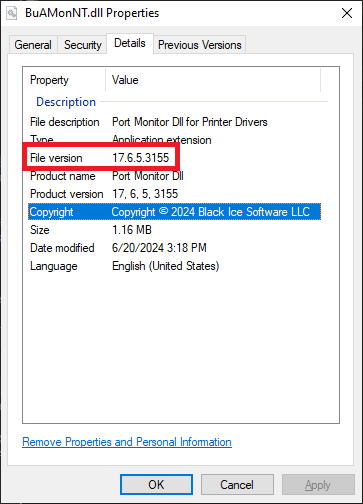
If the version of the DLLs matches, it is possible that the system still has one of the old DLLs loaded in memory. In this case, please restart the system.
If the versions do not match, one of these files was probably locked by some printing application or the system, and the uninstaller could not uninstall or update the file. To solve the problem, please follow these steps:
- Disable your anti-virus temporarily.
- Close all applications.
- Please uninstall the driver.
-
To make sure all files are removed successfully, please download and run the Black Ice Uninstaller utility from the following link:
https://www.blackice.com/downloads/customer/BiUninstaller/BiUninstaller.exe
- Restart the system. Locked files are removed when the system is restarted.
- Try to install the Printer Driver name again.