
Print2Email MSI Installer for Large Scale Deployment
The MSI installer for Print2Email designed for large scale deployment in Active Directory environments. With the Print2Email installer System Administrators can create custom configurations for every User on the system and register or activate the Print2Email. The MSI installer will greatly simplify mess deployment and eliminates the need for customers to build custom installations.
The MSI installer is compatible with Microsoft SMS/SCCM, Zenworks, and Marimba.
Key MSI features:
- Pre-configure the Print2Email using the INI file, such as email settings, recipients, and more. Every feature of the Print2Email can be pre-configured.
- Configure Email providers, Username and Password for Google, Yahoo, Hotmail, iCloud, Exchange, AOL, MAPI (Outlook) and SMTP settings
- Configure Email fields of To:, CC:, BCC:.
- Configure Email subject and body
- Sending the email silent mode
- Delete attachment files after the email is sent
- Enable Logging and error reporting preferences
Please contact sales for more technical details on the MSI installer at sales@blackice.com.
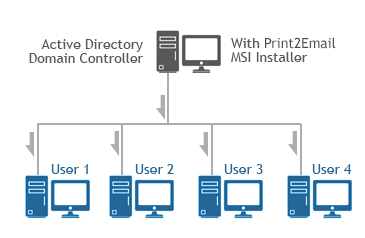
Supported Installation methods using Group Policy Deployment;
- Assign to Computer (silent install)
- Assign to User (silent install)
- Publish
Additional supported installation method;
- Installation from command line (cmd.exe)
Supported Operating Systems;
- Windows 11 (64 bit)
- Windows 10 (32 bit and 64 bit)
- Windows Server 2025 (64 bit)
- Windows Server 2022 (64 bit)
- Windows Server 2019 (64 bit)
- Windows Server 2016 (64 bit)
- Windows Server 2012 R2 (64 bit)
- Citrix XenApp, Citrix XenDesktop
- VMware Horizon + ThinApp, VMware VCenter
- Microsoft RemoteApp, Microsoft Hyper-V, Hyper-V VDI
Hyper-V is supported.
Requirement;
- .NET framework 4.0
For MSI Installer availability, contact sales@blackice.com .