
Using the FileFlow Server with Amazon SES
Amazon SES does not allow third party applications, like the FileFlow Server to use the Amazon SES email account, without the explicit approval of the account holder. Please scroll to the bottom of this page for further instruction how to use Amazon SES and get approval to use the FileFlow Server with Amazon SES.
To configure the FileFlow Server to use Amazon SES for email sending, please select the SMTP Server option on the Account Settings window.
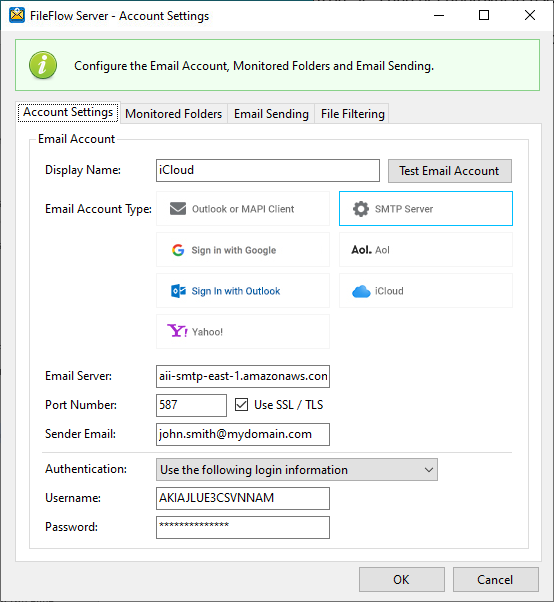
Please configure the SMTP Settings as the following:
Email Server: Enter the Amazon SES SMTP Endpoint. For example, if you want to use the Amazon SES endpoint in the US West (Oregon) region, the outgoing mail server would be email-smtp.us-west-2.amazonaws.com. For more information, please refer to the following link: Connecting to the Amazon SES SMTP Endpoint.
Port Number: 25, 587, or 2587 (to connect using STARTTLS), or 465 or 2465 (to connect using TLS Wrapper).
NOTE: The entered email address needs to be verified before one can send an email from it. For more information about verifying email addresses and domains, see Verifying Email Addresses and Domains in Amazon SES .
Authentication
Select the Use the following account settings option in the Authentication drop-down, and provide the Account Name and Password.
NOTE: Use the SMTP user name, not the AWS access key ID. The SMTP credentials and the AWS credentials are not the same. For information about how to obtain SMTP credentials, see Obtaining Your Amazon SES SMTP Credentials.
Username / Email: Enter the provided username.