
How to disable Microsoft Outlook Windows Security Popup?
The pop-up asking for access for Print2Email to work with Outlook can appear if the “Use legacy MAPI for email sending” option is checked in Print2Email.
Please open Print2Email and, on the Email Providers tab, make sure that the “Use legacy MAPI for email sending” option is unchecked, as shown in the screenshot below.
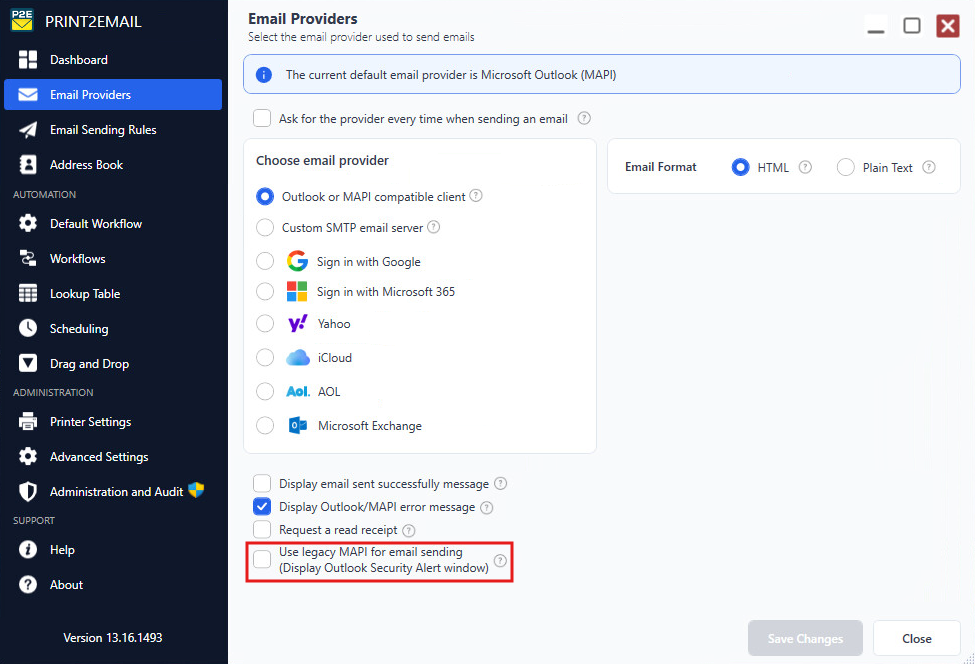
Alternatively, please try the “Sign in with Microsoft 365” option on the Email Providers tab.
With this option, Print2Email will use its own Email Sender window instead of Outlook’s Email Sender window, and you will not see the security pop-up.