
Check Event Logging Error and for Auditing
When the Event Logging is enabled, the Printer Driver logs every occurring error, warning and general information of every print job into the Event Viewer.
In order to check the logs, navigate to Windows Event Viewer.
First open the Event Viewer. In the start menu type Event Viewer and click on the application to open the Windows Event Viewer or right-click on Start -> Run -> Type in “eventvwr” -> Press Enter.
Then navigate to Windows Logs > Applications, to see the event logs. The events, where the Printer Driver name is in the Source column were logged by the printer driver.
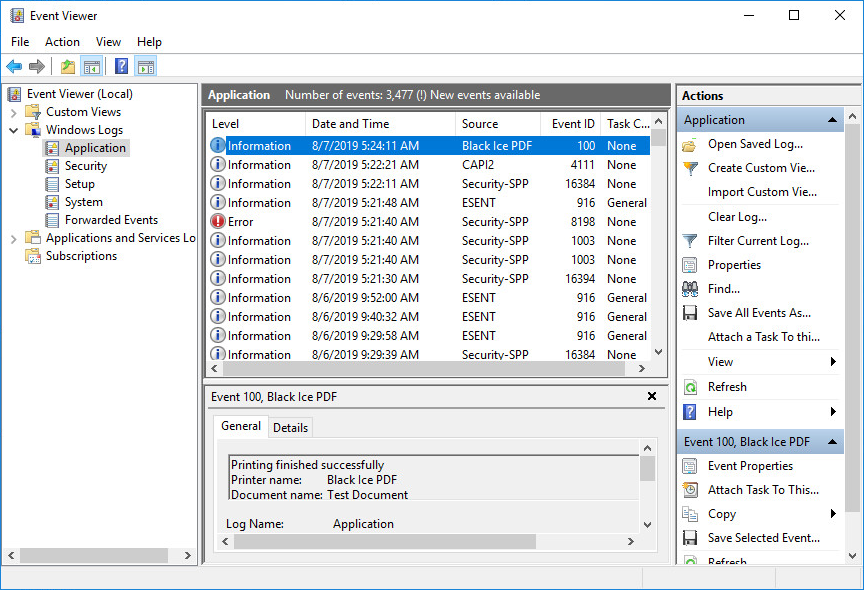
When the Event Logging feature is turned on, the following information can be written into the Event Viewer:
Event: Printing finished successfully
Set the "Event Logging Level" in the printer driver INI file to 3, in order to generate event if print job finished successfully.
Event ID: 100
Level: Information
Source: name of the printer that generated the event
Log Name: Application
Event data:
- Printer name: name of the printer that generated the event
- Document name: the name of the printed document
- User name: name of the printing user
- Date submitted: the date and time the print job was submitted
- Date printed: the date and time the print job finished printing
- Computer name: name of the computer that generated the print job
- IP Address: IP address of the computer that generated the print job
- Host name: host name of the computer that generated the print job
Event: Printing was aborted
Set the "Event Logging Level" in the printer driver INI file to 2 or 3, in order to generate event if the print job was aborted.
A print job can be aborted either by the user or because of an error. If the print job is aborted because of an error, the abort event is preceded by an Error event.
Event ID: 101
Level: Warning
Source: name of the printer that generated the event
Log Name: Application
Event data:
- Printer name: name of the printer that generated the event
- Document name: the name of the printed document
- User name: name of the printing user
- Date submitted: the date and time the print job was submitted
- Date aborted: the date and time the print job was aborted
- Computer name: name of the computer that generated the print job
- IP Address: IP address of the computer that generated the print job
- Host name: host name of the computer that generated the print job
Event: Error during printing
Set the "Event Logging Level" in the printer driver INI file to 1 or 2 or 3, in order to generate event if an error occurs during printing.
This event is usually followed by an abort event. (Event ID: 101)
Event ID: 102 (Please note the error code below is not the same as the Event ID.)
Level: Error
Source: name of the printer that generated the event
Log Name: Application
Event data:
- Printer name: name of the printer that generated the event
- Document name: the name of the printed document
- User name: name of the printing user
- Date submitted: the date and time the print job was submitted
- Date aborted: the date and time of the error
- Computer name: name of the computer that generated the print job
- IP Address: IP address of the computer that generated the print job
- Host name: host name of the computer that generated the print job
- Error: the error code and error message. Please note the error code is not the same as the Event ID. The Event ID is always 102 for printing errors.
Please see the table below for the list of possible error codes and messages:
| Error Code | Description |
|---|---|
| 1 | Invalid metafile handle when creating the TIFF file. Possible memory corruption, or error in the printing application. |
| 2 | Could not create a file name for the TIFF file. |
| 3 | The version of the Tiff32.dll is incorrect. Functions are missing from the Tiff32.dll. |
| 4 | Error locking the memory of the DIB. Possibly out of memory. |
| 5 | Error opening the TIFF file. Check the permissions to the output folder, or the file when appending or overwriting to an existing file. Check that there is enough disk space. |
| 6 | Invalid pointer, possible memory corruption. |
| 7 | Invalid pointer, possible memory corruption. |
| 8 | Error creating a TIFF page. |
| 9 | Error while encoding the TIFF file. |
| 10 | Error opening the TIFF file. Check the permissions to the output folder, or the file when appending or overwriting to an existing file. Check that there is enough disk space. |
| 11 | Error while encoding the TIFF file. |
| 12 | Invalid metafile handle when creating the JPEG file. Possible memory corruption, or error in the printing application. |
| 13 | Could not create a file name for the JPEG file. |
| 15 | Error saving the image into a JPEG file. Check the permissions to the output folder, or the file when overwriting an existing file. Check that there is enough disk space. |
| 16 | Error saving the image into a JPEG file. Check the permissions to the output folder, or the file when overwriting an existing file. Check that there is enough disk space. |
| 17 | Invalid metafile handle when creating the JPEG LAB file. Possible memory corruption, or error in the printing application. |
| 18 | Could not create a file name for the JPEG LAB file. |
| 19 | Invalid DIB handle when creating the JPEG LAB file. |
| 20 | The version of the Jpeg32.dll is incorrect. Functions are missing from the Jpeg32.dll. |
| 21 | Error saving the image into a JPEG LAB file. Check the permissions to the output folder, or the file when overwriting an existing file. Check that there is enough disk space. |
| 22 | Invalid metafile handle when creating the BMP file. Possible memory corruption, or error in the printing application. |
| 23 | Could not create a file name for the BMP file. |
| 24 | Invalid DIB handle when creating the BMP file. |
| 25 | Error creating the BMP file. Check the permissions to the output folder, or the file when overwriting an existing file. Check that there is enough disk space. |
| 26 | Error writing to the BMP. Check that there is enough disk space. |
| 27 | Invalid metafile handle when creating the CALS file. Possible memory corruption, or error in the printing application. |
| 28 | Could not create a file name for the CALS file. |
| 29 | Invalid DIB handle when creating the CALS file. |
| 30 | Error creating CALS file. The version of the Tiff32.dll is incorrect. Functions are missing from the Tiff32.dll. |
| 31 | Error saving the image into a CALS file. Check the permissions to the output folder, or the file when overwriting an existing file. Check that there is enough disk space. |
| 32 | Invalid metafile handle when creating the Raw TIFF file. Possible memory corruption, or error in the printing application. |
| 33 | Could not create a file name for the Raw TIFF file. |
| 34 | Invalid DIB handle when creating the Raw TIFF file. |
| 35 | Error Writing Raw TIFF file. The version of the Tiff32.dll is incorrect. Functions are missing from the Tiff32.dll. |
| 36 | Error creating the Raw TIFF file. Check the permissions to the output folder, or the file when overwriting an existing file. Check that there is enough disk space. |
| 37 | Error encoding the CCITT image. This error occurs when you try to print Raw TIFF file. |
| 38 | Invalid metafile handle when creating the PCX file. Possible memory corruption, or error in the printing application. |
| 39 | Could not create a file name for the PCX file. |
| 40 | Invalid DIB handle when creating the PCX file. |
| 41 | Error converting the output filename from UNICODE to ASCII. This error occurs when you try to print PCX file. (Printer Drivers version 15.21 or older.) |
| 42 | Invalid metafile handle when creating the DCX file. Possible memory corruption, or error in the printing application. |
| 43 | Could not create a file name for the DCX file. |
| 44 | Invalid DIB handle when creating the DCX file. |
| 45 | Error creating the DCX file. Check the permissions to the output folder, or the file when overwriting an existing file. Check that there is enough disk space. |
| 46 | Invalid metafile handle when creating the EMF file. Possible memory corruption, or error in the printing application. |
| 47 | Could not create a file name for the EMF file. |
| 48 | Error creating the EMF file. Check the permissions to the output folder, or the file when overwriting an existing file. Check that there is enough disk space. |
| 49 | Error locking the memory. This error occurs when you try to print into EMF file. |
| 52 | Error copying bitmap lines. Possible memory corruption. |
| 53 | Invalid DIB handle. Possible memory corruption. |
| 54 | Invalid DIB handle. This error can occur, when the orientation is Landscape and the “Rotate landscape image to portrait” checkbox is checked in the printing preferences of the printer. In this case the port monitor dll rotates the DIB by 90 degrees during printing. When the rotation fails the internal error 54 occurs. Possibly out of memory. |
| 56 | Error adding the demo bitmap to the image. |
| 57 | Error dithering the image. |
| 58 | Error flipping the image horizontally. |
| 59 | Error flipping the image vertically. |
| 60 | Memory allocation error. This error occurs in case of printing color separation images. |
| 61 | Error splitting the color channels. |
| 62 | Error converting the 32 bit DIB to 24. |
| 63 | Error updating the page numbers in the TIFF file. Check if there is enough disk space and there is no anti-virus or other software locking the TIFF file. |
| 100 | Invalid metafile handle. Possible memory corruption, or error in the printing application. |
| 101 | Error locking the memory of the metafile. Possible memory corruption. |
| 101 | Could not create a file name for the IOCA file. |
| 102 | Memory allocation error. This error occurs during reading the metafile. Possible memory corruption, or error in the printing application. |
| 103 | Error locking the memory allocated for the metafile. This error occurs during reading the metafile. Possible memory corruption, or error in the printing application. |
| 104 | Error saving the enhanced metafile. Check the permissions to the output folder, or the file when overwriting an existing file. Check that there is enough disk space. |
| 110 | Custom filename generation - File path too long. The total file path must not be longer then 259 characters. |
| 111 | Custom filename generation - Invalid template. Please check the INI file documentation for the valid template format. |
| 112 | Custom filename generation - Output directory does not exist. |
| 113 | Custom filename generation - Document name too long. The total file path must not be longer then 259 characters. |
| 114 | Custom filename generation - Extension too long. The total file path must not be longer then 259 characters. |
| 127 | BiPDFP.dll or the BiPDFInterfaceP.dll is too old for the driver |
| (During install, the error "AddMonitor returned with error code: 127" is a windows error, it means a function used by the Port Monitor is missing from one of the DLLs, usually from the BiPDFP.dll or the BiPDFInterfaceP.dll) | |
| 130 | Cannot open registry key containing printer driver information. |
| 131 | Cannot read installation directory from registry |
| 132 | Cannot read Product ID from registry |
| 133 | Cannot read printer name from registry |
| 134 | Cannot read version number from registry |
| 136 | Error loading BuRegister.dll |
| 137 | Error loading license checking function from BuRegister.dll |
| 140 | Error loading printer count checking function from BuRegister.dll |
| 145 | Error verifying dlls: Cannot open registry key |
| 146 | Error verifying dlls: Cannot read target dir from registry |
| 151 | Error verifying eLicense.dll: Digital signature verification failed. |
| 152 | Error verifying eLicense.dll: Error getting name of signer. (1) |
| 153 | Error verifying eLicense.dll: Error getting name of signer. (2) |
| 154 | Error verifying eLicense.dll: Error getting name of signer. (3) |
| 155 | Error verifying eLicense.dll: Error getting name of signer. (4) |
| 156 | Error verifying eLicense.dll: Error getting name of signer. (5) |
| 157 | Error verifying eLicense.dll: The signer is not Black Ice Software LLC |
| 161 | Error verifying BuRegister.dll: Digital signature verification failed. |
| 162 | Error verifying BuRegister.dll: Error getting name of signer. (1) |
| 163 | Error verifying BuRegister.dll: Error getting name of signer. (2) |
| 164 | Error verifying BuRegister.dll: Error getting name of signer. (3) |
| 165 | Error verifying BuRegister.dll: Error getting name of signer. (4) |
| 166 | Error verifying BuRegister.dll: Error getting name of signer. (5) |
| 167 | Error verifying BuRegister.dll: The signer is not Black Ice Software LLC |
| 200 | Error closing the Image PDF file. Check if there is enough disk space and there is no anti-virus or other software locking the TIFF file. |
| 201 | Error saving the Image PDF file. Check if there is enough disk space and there is no anti-virus or other software locking the file. |
| 202 | Error opening the PDF file for appending. Check the permissions to the output folder and the file. Check if there is enough disk space and there is no anti-virus or other software locking the file. |
| 203 | Error initializing the PDF object. |
| 204 | Error creating PDF file. Check the permissions to the output folder, or the file when overwriting an existing file. Check that there is enough disk space. |
| 205 | Error saving the DIB into PDF file. Check if there is enough disk space and there is no anti-virus or other software locking the file. |
| 206 | Error closing the PDF file. Possible memory corruption. |
| 207 | Error closing the PDF file. Check if there is enough disk space and there is no anti-virus or other software locking the file. |
| 208 | Error closing the PDF file. Possible memory corruption. |
| 209 | Invalid metafile handle when creating the PNG or GIF file. Possible memory corruption, or error in the printing application. |
| 210 | Could not create a file name for the PNG or GIF file. |
| 211 | Invalid DIB handle when creating the PNG or GIF file. |
| 212 | Error saving the PNG or GIF file. Check the permissions to the output folder, or the file when overwriting an existing file. Check that there is enough disk space. |
| 251 | Error filling bitmap info header. The information for bitmap header is taken from the devmode. |
| 252 | Error creating bitmap, possibly out of memory. |
| 300 | Error writing the HTML file. Check if there is enough disk space and there is no anti-virus or other software locking the file. |
| 301 | Error creating HTML file. Check the permissions to the output folder, or the file when overwriting an existing file. Check that there is enough disk space. |
| 302 | Error writing the XML file. Check if there is enough disk space and there is no anti-virus or other software locking the file. |
| 303 | Error creating XML file. Check the permissions to the output folder, or the file when overwriting an existing file. Check that there is enough disk space. |
| 304 | Error in the output filename. This error occurs when you try to print into XML file. |
| 305 | Memory allocation error. This error occurs when you try to print into XML file. Possibly out of memory. |
| 306 | Error saving the PCX file. Check the permissions to the output folder, or the file when overwriting an existing file. Check that there is enough disk space. |
| 307 | Error creating interface for the PDF writer. |
| 310 | PDF Error: Failed to open the PDF file for writing. |
| 311 | PDF Error: WinAPI error while writing PDF file. |
| 312 | PDF Error: Invalid handle value |
| 313 | PDF Error: File already exists |
| 314 | PDF Error: Invalid image size |
| 315 | PDF Error: Invalid bits per pixel value |
| 316 | PDF Error: Invalid string |
| 317 | PDF Error: Null pointer |
| 318 | PDF Error: Zero bytes to write |
| 319 | PDF Error: Invalid DPI value |
| 320 | PDF Error: Memory allocation error |
| 321 | PDF Error: The object already exists |
| 322 | PDF Error: Too many objects |
| 323 | PDF Error: Invalid resource type |
| 324 | PDF Error: Invalid stream size |
| 325 | PDF Error: The filter (compression) type currently is not supported |
| 326 | PDF Error: Negative value is not supported |
| 327 | PDF Error: Error accessing the temp directory |
| 328 | PDF Error: Error accessing the temp file |
| 329 | PDF Error: Invalid TIFF32.DLL |
| 330 | PDF Error: Encoding has failed |
| 331 | PDF Error: Invalid JPEG dll name |
| 332 | PDF Error: Invalid parameter |
| 333 | PDF Error: Open file error |
| 334 | PDF Error: Invalid PDF file format |
| 335 | PDF Error: PDF version is not supported |
| 336 | PDF Error: Read file error |
| 337 | PDF Error: Error during decompression |
| 338 | PDF Error: Invalid palette |
| 339 | PDF Error: Compression mode is not supported |
| 340 | PDF Error: CCITT decompression is failed |
| 341 | PDF Error: Invalid page number |
| 342 | PDF Error: PDF object is not initialized by InitPDF |
| 343 | PDF Error: Invalid ProcSet |
| 344 | PDF Error: Invalid object type |
| 345 | PDF Error: Invalid object number or it has invalid location offset |
| 346 | PDF Error: Font registration error |
| 347 | PDF Error: Error during uncompression |
| 348 | PDF Error: Password authentication error |
| 349 | PDF Error: Create file error |
| 350 | PDF Error: Invalid PDF object |
| 351 | PDF Error: Not all of pages have been written |
| 352 | PDF Error: Error during compression |
| 353 | PDF Error: Entry is missing |
| 354 | PDF Error: Error during writing the font |
| 355 | PDF Error: The loaded PDF object is illegal |
| 356 | PDF Error: Error during writing the image |
| 357 | PDF Error: Illegal operation before closing the opened path |
| 358 | PDF Error: Error during drawing on the PDF page |
| 359 | PDF Error: The page rasterization must be done before getting position of glyphs |
| 400 | The resource DLL has been modified. |
| 401 | DLL mismatch. The version of the User Interface DLL (Bu?Uif??.dll) and the Port Monitor DLL (Bu?Mon??.dll) is not the same. |
| 402 | Error Loading DLL (DLL name in the error message) |
| 403 | Black Ice Form Filler Error: Could not create security descriptor |
| 404 | Black Ice Form Filler Error: Could not create event object |
| 405 | Black Ice Form Filler Error: Could not create mutex object |
| 406 | Black Ice Form Filler Error: Cover Page Filler closed without submitting cover page |
| 407 | Black Ice Form Filler Error: Error while waiting for Cover Page Filler |
| 408 | Black Ice Form Filler Error: Could not open memory map |
| 409 | Black Ice Form Filler Error: Could not allocate memory for cover page |
| 410 | Black Ice Form Filler Error: Could not load cover page (TIFF error) |
| 411 | Black Ice Form Filler Error: Could not load annotations from the cover page |
| 412 | Black Ice Form Filler Error: Could not load cover page template |
| 413 | Black Ice Form Filler Error: Could not load function from DLL (name in the error message) |
| 414 | HTTP upload error: Failed to send pipe message to HTTP uploader |
| 415 | HTTP upload error: Failed to send document to HTTP uploader |