
Configuring Custom Document ID (Index) for Database Uploading
To print, convert and save documents into a database with a unique identifier, the Index/Document ID can be used. The Index/Document ID helps users to identify the documents in the database, or to reference a document and perform a post-action, once the document has been in the database.
The Index/Document ID can be configured through the Document ID format field.
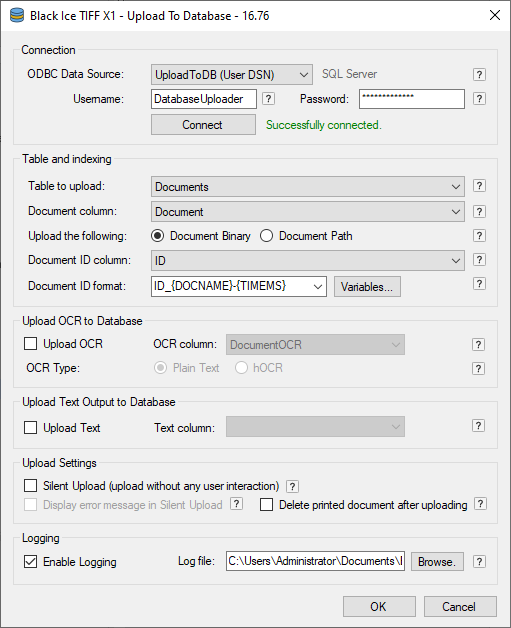
The Document ID format field accepts letters, digits, dash (-), underscore (_) characters and the following predefined variables:
| Predefined Variable | Meaning |
|---|---|
| {DOCNAME} | Document Name |
| {USERNAME} | User Name |
| {COMPUTER} | Computer Name |
| {DATE} | Date |
| {TIME} | Time |
| {DATETIME} | Date and Time |
| {TIMEMS} | Time with Millisec. |
The predefined variables will be substituted during the printing process.
For example, if the configured Index/Document ID format is ID-{DOCNAME}
- And printing a document named MyDocument995.PDF
- Then the Index/Document ID in the database will be ID-MyDocument995
Another example, if the configured Document ID format is ID-{DOCNAME}_{TIMEMS}, and we printing at 10/30/2019 15:30:11.222
- And printing a document named MyDocument995.PDF
- Then the Index/Document ID in the database will be ID-MyDocument995_20191030153011222