
Reply-To feature
The Enable Reply-To feature in the Email Fields section of the Email Sending tab lets you specify a different email address for recipient replies. This is useful when emails are sent from a shared, automated, or no-reply account, but responses should be directed to another mailbox.
To enable the feature, select Enable Reply-To and enter a valid email address in the Reply-To field. The option is also available for individual Workflows under Workflow Editor → Recipients.
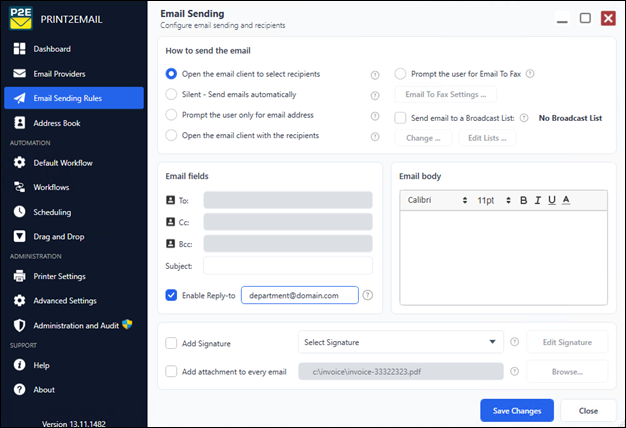
When enabled, Print2Email adds the configured Reply-To address to every email sent using those settings. When a recipient selects Reply, their email application should address the response to the Reply-To address instead of the original sender.
The recipient can still manually change the destination address, and some email applications or organizational policies may ignore the Reply-To setting.
Yahoo and AOL may reject messages containing an unverified Reply-To address. In this case, add the address as a Send-only email address in the Yahoo or AOL mailbox settings, complete the verification, and then try sending again.
The feature is not available when Use legacy MAPI for email sending is enabled. Standard Outlook email sending remains supported.