
Jump to main content
Black Ice Software logo
PDF Printer Driver Online Manual
  • Introduction
  • Installation, Licensing and Registration
  • Black Ice Printer Manager
  • Configuring the PDF Printer Driver Printing Preferences
    • Device Settings Tab
    • File Formats Tab
    • Filename Generation Tab
      • Save As Dialog
      • Filename Generation Method
      • Combine/Merge multiple documents into a single file
      • Output Directory
      • Upload document to SharePoint
      • Send document in Email
      • Troubleshooting
    • Start Application
    • Watermark/Stamp Tab
    • Annotation-Header-Footer tab
    • Text Output Tab
    • Bates Numbering Tab
    • Profile Manager Tab
    • Redirect Printing Tab
    • OCR Tab
  • PDF Printer Driver Configuration
  • Frequently Used Configurations
  • Document Converter Configuration Manager
  • The API - Resource Toolkit (RTK)
  • Frequently Asked Questions (F.A.Q.)
  • Troubleshooting
  • Licenses
  • Technical Support

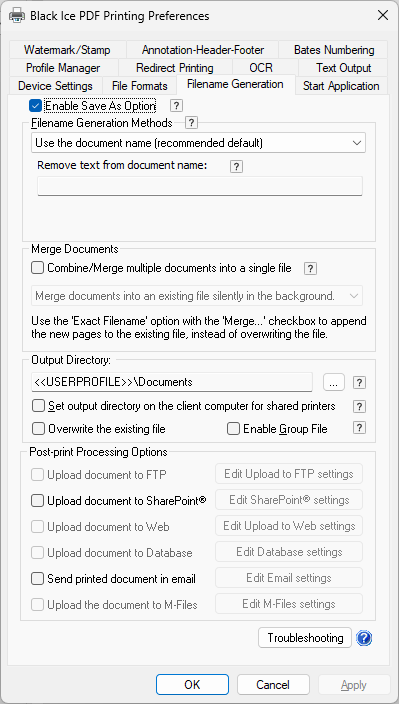
Filename Generation Tab

The Black Ice Printer Drivers provide complete control over the names of the files generated when printing. On the Filename Generation tab, the user is able to configure the Upload and Email options.
  • Save As Dialog
  • Filename Generation Method
    • Custom File Name Configuration
  • Combine/Merge multiple documents into a single file
  • Output Directory
    • Group File Description
  • Upload document to SharePoint
  • Send document in Email
  • Troubleshooting
© Black Ice Software, LLC 1989 - 2026. All rights reserved.