
Jump to main content
Black Ice Software logo
ColorPlus X1 Printer Driver Online Manual
  • Introduction
  • Installation, Licensing and Registration
  • Black Ice Printer Manager
  • Configuring the ColorPlus X1 Printer Driver Printing Preferences
    • Device Settings Tab
      • Select Paper Size
      • Specifying Page Orientation
      • Specifying Graphic Resolution
      • Create Faxable Image
      • Pages to Print
      • Pages Per Sheet (N-Up) Printing
      • Print Preview Window
      • Restore Defaults
      • Save Settings for All Users
      • About…
    • File Formats Tab
    • Filename Generation Tab
    • Start Application
    • Watermark/Stamp Tab
    • Annotation-Header-Footer tab
    • Text Output Tab
    • Bates Numbering Tab
    • Profile Manager Tab
    • Redirect Printing Tab
    • Barcode Tab
    • OCR Tab
  • ColorPlus X1 Printer Driver Configuration
  • Frequently Used Configurations
  • Document Converter Configuration Manager
  • Supported Barcode Standards
  • The API - Resource Toolkit (RTK)
  • Frequently Asked Questions (F.A.Q.)
  • Troubleshooting
  • Licenses
  • Technical Support

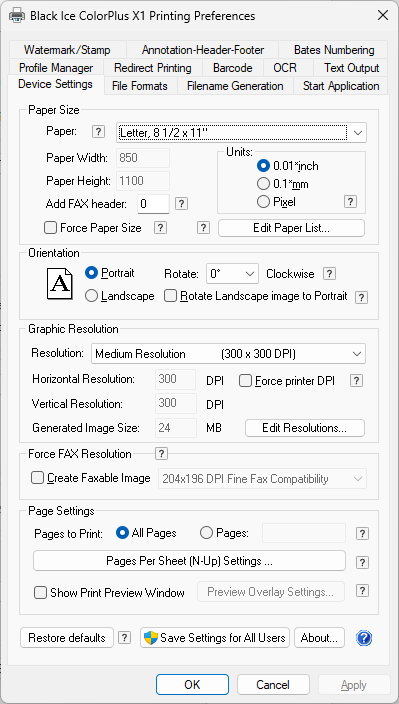
Device Settings Tab

Under the Device Settings tab, users can change paper sizes, orientation, resolution of the output documents, and configure N-Up Settings.
  • Select Paper Size
    • Available Paper Sizes
    • Add or Edit Custom Paper Sizes
    • Printing document with different page sizes
    • Add large paper sizes
  • Specifying Page Orientation
  • Specifying Graphic Resolution
  • Create Faxable Image
  • Pages to Print
  • Pages Per Sheet (N-Up) Printing
  • Print Preview Window
  • Restore Defaults
  • Save Settings for All Users
  • About…
© Black Ice Software, LLC 1989 - 2026. All rights reserved.