Please download the BiUninstaller from the following links:
https://www.blackice.com/downloads/customer/BiUninstaller/BiUninstaller.exe
The BiUninstaller can delete the installed Black Ice Printer Driver in silent mode.
How to use:
Please use the following command to uninstall and reboot the computer automatically:
BiUninstaller.exe silent yes
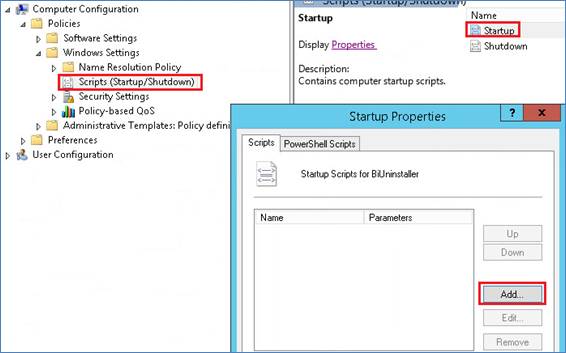
Example for Group Policy login script:
Copy the BiUninstaller.exe to the shared directory.
Open the Group Policy Management and add new logon script:
Add Script Name:
[Shared directory path]\BiUninstaller.exe
Add Script Parameters:
silent yes
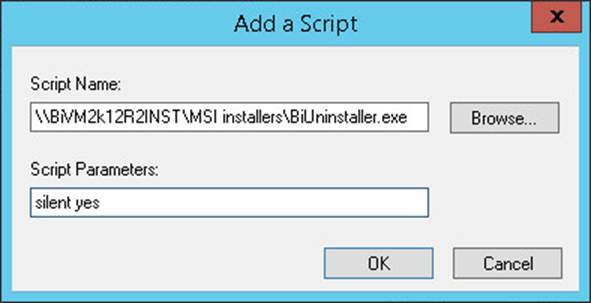
Click on the OK button and apply.
Note:
A computer restart may be required, although the computer can be restarted later to finish the uninstall process.
If a computer restart is required, the computer MUST be restarted before installing the new version of the Printer Driver.
Requirements:
Microsoft .NET Framework 4.0 or higher version
http://www.microsoft.com/en-us/download/details.aspx?id=24872
If the BiUninstaller utility has been run successfully in silent mode, please try to install the Black Ice Product on the system.