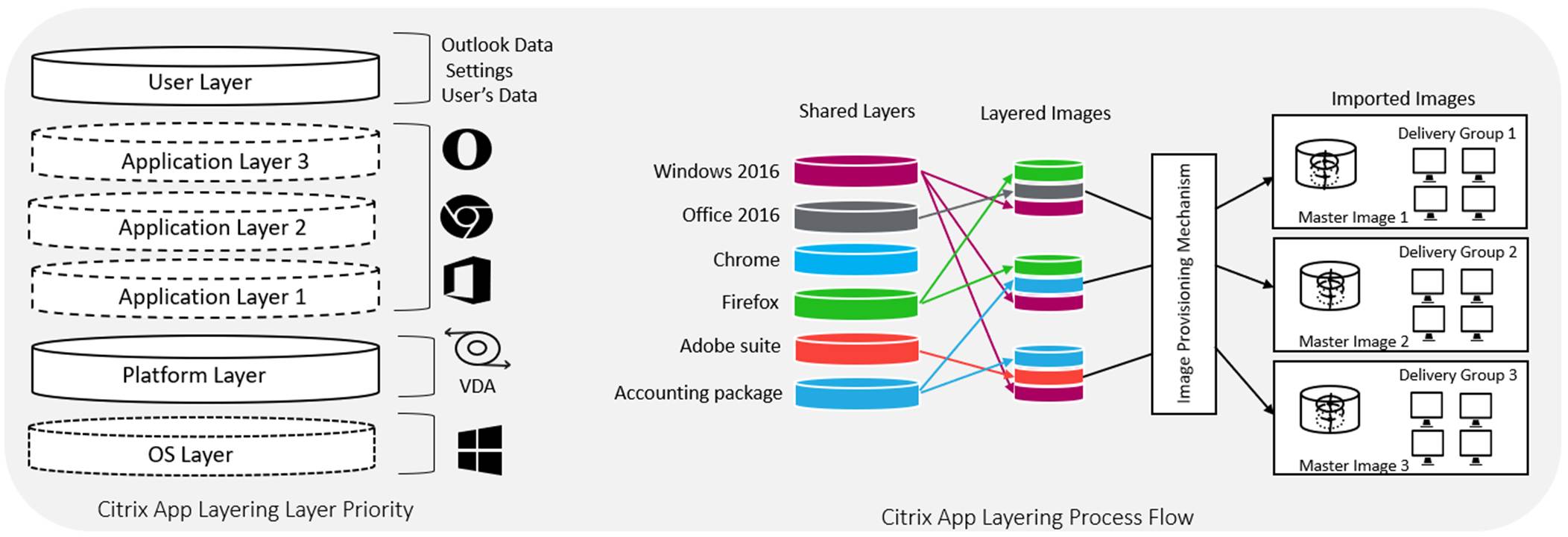
The diagram below illustrates the Citrix App Layering. The Citrix App Layering actually puts applications on a plane separate from the OS and splits the application into three main layers. Each layer is stored as a virtual disk. The base layer contains the OS itself.
The Black Ice Printer Driver should be installed and activated/registered on the OS layer; otherwise, Black Ice Printer Driver will deactivate as soon as the desktop is delivered to users.
An alternative solution is to install the Black Ice Printer Driver on the Master Image and activate/register it on the Master Image. Installing the Black Ice Printer Driver on the Master image could be cumbersome and time-consuming. The Black Ice Printer Driver should not be installed and activated/registered on the Application Layer.
The Black Ice Printer Driver requires a special installer for Citrix VDI with a special licensing mechanism that can be requested from sales@blackice.com.