The cause of the “Error checking license: 201: Date was set back” error is that the Windows date was set to an earlier date, causing the evaluation version to expire.
To resolve the “Error checking license: 201: Data was set back” problem, please make sure the date and time are set correctly on your Windows system and reinstall the PDF Server Printer Driver.
If the Printer Driver evaluation period has expired, we can extend the Printer Driver evaluation period.
To extend the evaluation period, we will need the MAC address of the computer you installed the Printer Driver.
You can do this by following these simple steps.
1. Click Start
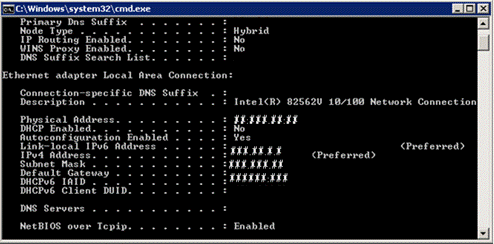
2. Type cmd to open the command prompt (You will get the following dialog box)
3. Type ipconfig /all with no spaces
4. The MAC address is also referred to as the Physical Address, which is the number we need.
Please email us the MAC address or Physical Address so we can delete it from the license server.
Once we delete the MAC address from our license server, you will have to uninstall and reinstall the PDF Server Printer Driver.