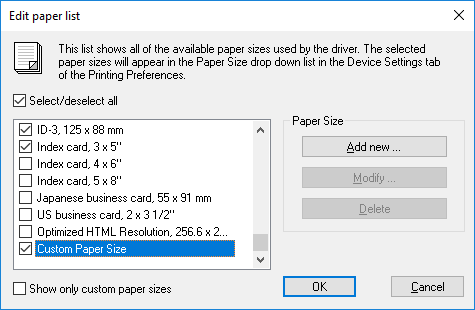
The Black Ice Printer Driver provides predefined paper sizes, including large-format and label printer paper sizes. To configure the paper size in the Printer Driver, please navigate to the Device Settings tab and select a predefined size from the Paper dropdown menu. Additionally, Black Ice Printer Drivers allow unique paper sizes to be defined in pixels, millimeters, or inches. To add, modify, or delete custom paper sizes, or to edit the list of available paper sizes, please click the Edit Paper List… button.
Edit Paper List
On the Edit Paper List window, the user can customize the paper sizes shown in the Paper dropdown menu, add new paper sizes, or modify or delete previously added custom paper sizes.
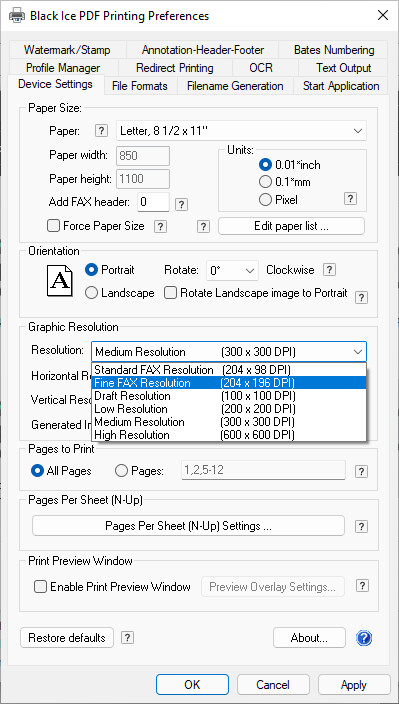
Select/deselect all
Selects or deselects every available paper size. Selected paper sizes appear in the Paper dropdown menu on the Device Settings tab.
Show only custom paper sizes
If the Show only custom paper sizes option is enabled, only custom paper sizes are displayed in the list, while standard paper sizes are hidden.
Add new
By clicking the Add new… button, a new custom paper size can be created. The name of the created paper size appears in the list of available paper sizes. The user can specify the width and height of the paper, using the available units of measurement: inches, millimeters, or pixels.
Roll paper size
If the Roll paper size option is enabled, the Printer Driver will automatically set the length for roll paper sizes based on the page content. The specified paper height will define the maximum length.
Please note that added custom paper sizes will only be visible for the current user. To add the paper size for all users, add the paper size as Administrator and use the Save Configuration for All Users button on the Printer Manager’s Administrator tab.
Modify
To edit the parameters of a selected paper size, please click the Modify option. Only custom paper sizes can be modified; standard paper sizes cannot be changed or deleted. The user can edit the name, width, height, and unit of measurement (inches, millimeters, or pixels) of a custom paper size.
Delete
To delete a selected paper size, click the Delete button. Standard paper sizes cannot be deleted. To temporarily remove a paper size from the list, disable its corresponding checkbox. This hides the paper size from the Paper dropdown menu.
NOTE: The Printer Driver can store the paper size in pixels or 0.1 millimeters. If the paper size is specified in 0.01 inches, due to the conversion, the actual size of the image can be slightly different. The difference can be a maximum of 0.1 mm.