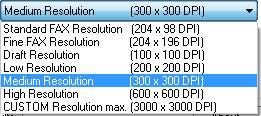
Default resolution (typically measured in dots per inch, or DPI), for printing graphic images.
200x200 DPI - If the Fax Output check box is selected the resolution is 200x200 dpi internally, but the image is stored as 204x196 dpi. This feature is useful when printing from an application that can’t print correctly when the horizontal and vertical resolution values are different. Selecting this setting will print the page correctly and the image can still be faxed.
300 x 300 DPI - Medium resolution.
600 x 600 DPI - High resolution.
1500x1500 DPI - The custom resolution can be set manually up to 1500 DPI in the “Horizontal Resolution” and “Vertical Resolution” fields. The “Horizontal” and “Vertical” resolution fields are grayed out until you select “CUSTOM Resolution max(1500x1500)”. Warning: When using settings over 600 DPI one should consider memory usage.
The Driver also supports variable dot per inch (DPI) graphic resolution that can range from 50 DPI to 1500 DPI.
Horizontal Resolution- Shows the horizontal resolution setting. Also, when Custom resolution is selected, the required value can be entered.
Vertical Resolution - Shows the vertical resolution setting. Also, when Custom resolution is selected the required value can be entered.
Force Printer Resolution - The document will be printed always using the printer’s resolution, regardless to the DPI setting stored in the document (I.E. in the case of the Microsoft Excel documents).
Generated Image Size - Displays the uncompressed image size in megabytes based on the current paper size, resolution and color depth.
Restore defaults - The “Restore defaults” button will restore all of the default printer settings from the printer configuration INI file.