To accommodate as many different monitor resolutions (800x600, 1024x768, etc.), browsers (Internet Explorer, Firefox, etc.), and platforms (Windows, Mac, etc.) as possible, most web pages are optimized for 800x600 or 1024x768 pixels (px), in order to avoid horizontal scrolling of web content.
Tip: To accommodate most browsers and platforms, specify the web page width at 970px.
Since most documents are either Letter size or A4 format, the question arises how to generate 970px width html pages optimized for most browsers and displays.
Printing applications, such as Microsoft Word or Adobe Acrobat, create a document based on the currently selected printer driver page size. The page setup feature of most applications uses the originally stored or the current page size of the selected printer driver.
Web optimized “paper size” (e.g. 970px) is not a common document size format. A custom paper size will have to be created in the printing application (e.g. Word), and also in the ColorPlus printer driver.
How to configure Black Ice Color printer driver for generating 970px wide html pages?
1. Check your monitor DPI setting:
Display Properties -> Settings -> Advanced -> General -> DPI settings
This setting is only needed for the creation of the web page. Once the HTML pages are created, the monitor resolution will not affect how the pages are displayed on different resolutions
2. Set the same DPI setting in Black Ice printer driver:
Properties -> Printing Preferences -> Graphic Resolution -> select CUSTOM Resolution and set Horizontal and Vertical Resolution to the same value as the monitor, then press Apply.
3. Create the optimal custom Paper Size for web content in Black Ice printer driver
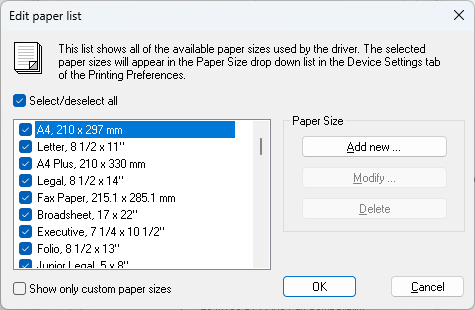
Properties -> Printing Preferences -> Paper Size -> Edit paper list
Press the Add new.. button
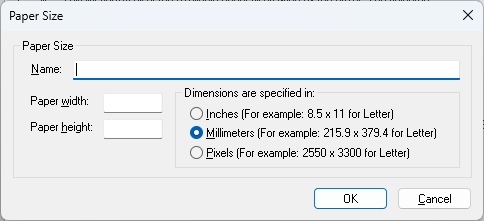
Specify the name of the new paper size, set dimensions to be specified in pixels, and set the paper height and width to the desired value. (e.g. 970x1000px)
This step maybe omitted if the ‘Optimum HTML Resolution’ paper size is chosen from the extended paper list. Optimized HTML Resolution paper size is predefined to 970x1100px.
4. Create the same page size in the printing application.
E.g. in Microsoft Word 2007 > Page Layout > Size > Choose more paper sizes… on the bottom of the list
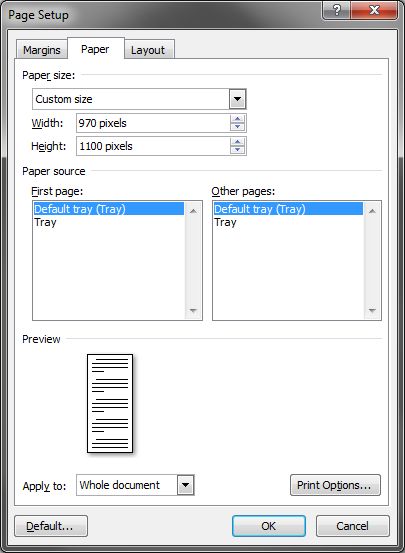
Choose custom size in the drop down menu, and specify the same width and height as in the Black Ice printer driver (for example, for width enter 970 pixels and height enter 1000 pixels).
If, in the previous step, the predefined ‘Optimized HTML Resolution’ paper size was used, it is not necessary to create a custom paper size in Word in this step. ‘Optimized HTML Resolution’ paper size will appear in the drop down menu and it just needs to be selected.
Press OK.
Now if a document is printed with the Black Ice printer driver, the output will be web pages with the specified width.