Error code 335 could occur if the network card is no longer available, has been disabled, or removed from your computer where you registered the Printer Driver.
Temporary or Virtual network interfaces (e.g., Docking Stations, Bluetooth Network Connections, VPN interfaces) can cause problems during license activation.
When a product is activated while a Temporary or Virtual network interface is present on the system, and the interface is later removed or disabled, the Black Ice license might get invalidated.
In such cases, a license error 335 is displayed by the product.
As a workaround, please follow these steps:
1. Navigate to Control Panel > Network and Sharing Center > Change adapter settings
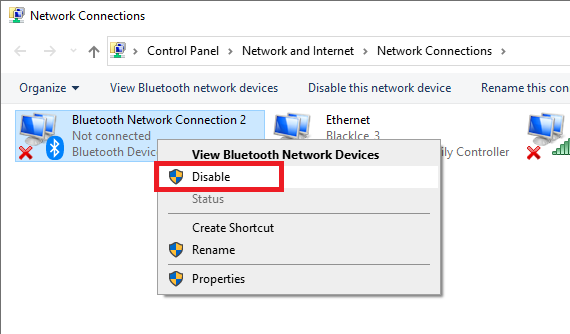
2. If you see any Temporary or Virtual network interfaces (e.g.: Bluetooth Network Connections, VPN interfaces). Right-click and click Disable on all of them. (Even if they say Not connected.)
3. Register the Printer Driver again.
4. Reenable the connections.
Another possible solution is to activate the Printer Driver through a static Ethernet card (that is not disabled even if it is not used) or a Wi-Fi connection and then connect the computer to a docking station, Bluetooth, or VPN to your network.
Another possible cause is:
It is possible that in Windows 11, the Use random hardware addresses Windows option has been turned on.
To solve the problem, please turn off the “Use random hardware addresses” option by following these steps:
Turn off random hardware addresses for new network connections:
1. Right-click the Start button, then select Settings > Network & Internet > Wi-Fi.
2. Turn off “Use random hardware addresses”.
Turn off random hardware addresses for a specific network:
1. Right-click the Start button, then select Settings > Network & Internet > Wi-Fi > Manage known networks.
2. Choose a network, then select Properties and turn off “Use random hardware addresses”.
3. Repeat these steps for all Wi-Fi networks you are using.
After turning off the “Use random hardware addresses” option for all networks, please disconnect from the docking station, restart the system, and make sure the new Wi-Fi settings are used, and register the Black Ice Printer Driver again.