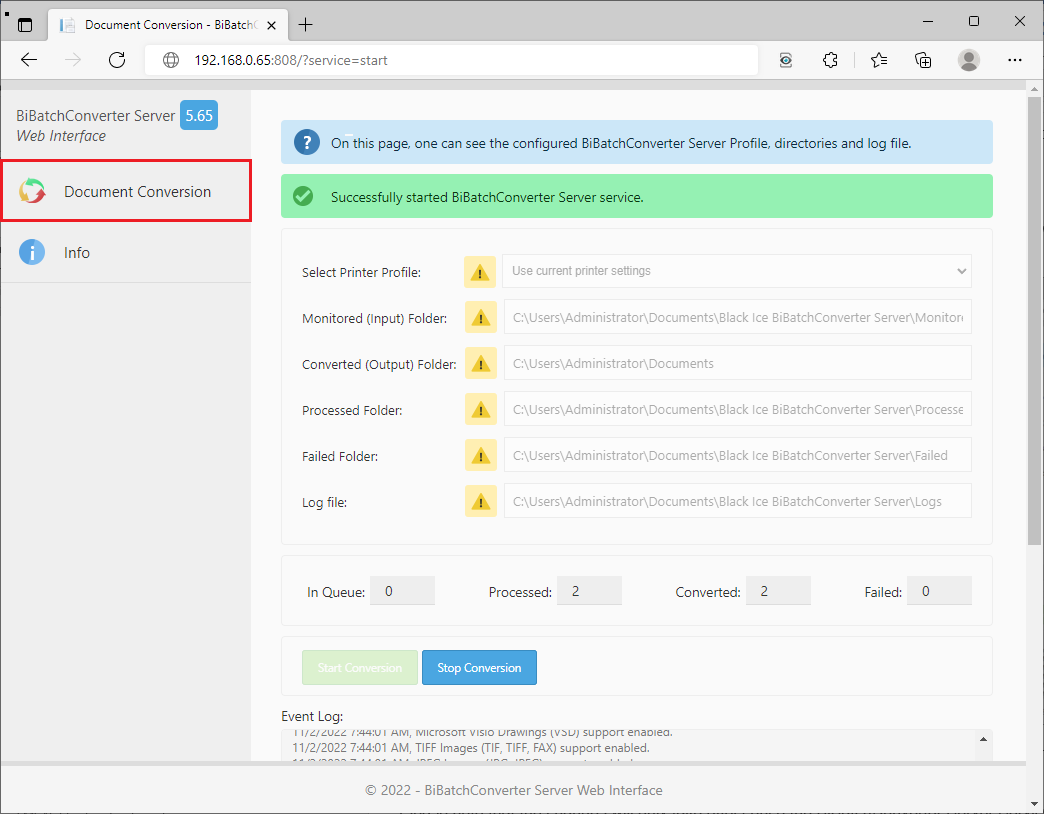
The BiBatchConverter Server Web Interface can be used to supervise and manage the document conversion remotely with the BiBatchConverter Server from any web browser.
Document Conversion
On the Document Conversion page, one can review the basic settings of the BiBatchConverter Server Service and the state of the document conversion.
One can see the selected Account (Task), Printer Profile, the configured monitored/converted/processed/failed folders, and review the BiBatchConverter Server log file in the Event Log section.
One can also modify the Monitored, Converted, Processed, Failed folder locations. To change the Printer Profile or folder locations, please stop the document conversion.
NOTE: In case of changing the folder locations, please keep in mind that the location must exist, and both the BiBatchConverter Server and the website need to have write access to the directories.
Please note that the changes will only take effect once the BiBatchConverter Server Service has been restarted. To restart the Service, click on the Stop Conversion button, then click on the Start Conversion button.
Info
The Info page contains information about the product version, license, and company.
