The BiBatchConverter Server uses Microsoft Word, Microsoft Excel, Microsoft PowerPoint, Microsoft OneNote, Foxit Reader, or Adobe Acrobat Reader for printing. You have to install these products before using the BiBatchConverter Server for converting documents. Please see the required third-party components below:
|
Input file extension |
Required Third Party Component |
|
DOCX, DOTX, DOCM, DOC, DOT |
Microsoft Office Word 365/2021/2016/2013/2010 or 2007 |
|
XLSX, XLS, XLSM, XLSB, CSV |
Microsoft Office Excel 365/2021/2016/2013/2010 or 2007 |
|
PPSX, PPS, PPT, PPTX |
Microsoft Office PowerPoint 2013 or 2010 or 2007 |
|
RTF |
Microsoft Office Word 365/2021/2016/2013/2010 or 2007 |
|
HTML, HTM, MHT, MHTML |
Internet Explorer 8 or higher. |
|
ONE |
Microsoft OneNote |
|
ONEPKG |
Microsoft OneNote |
|
DWG |
AutoCAD |
|
|
Adobe Reader 10 or higher Adobe Acrobat Pro 10 or higher Foxit Reader 9.6 or higher |
|
XPS |
XPS Viewer |
|
TXT |
Microsoft Office Word 365/2021/2016/2013/2010 or 2007 |
|
DCM |
Included |
|
MSG, EML |
Included |
|
TIFF |
Included |
|
FAX |
Included |
|
JPEG |
Included |
|
GIF |
Included |
|
BMP |
Included |
|
PNG |
Included |
|
EMF |
Included |
NOTE: The Microsoft Office must be registered on the system to print MS Word, Excel, PowerPoint, and TXT files with the BiBatchConverter Server.
Detecting Supported Files
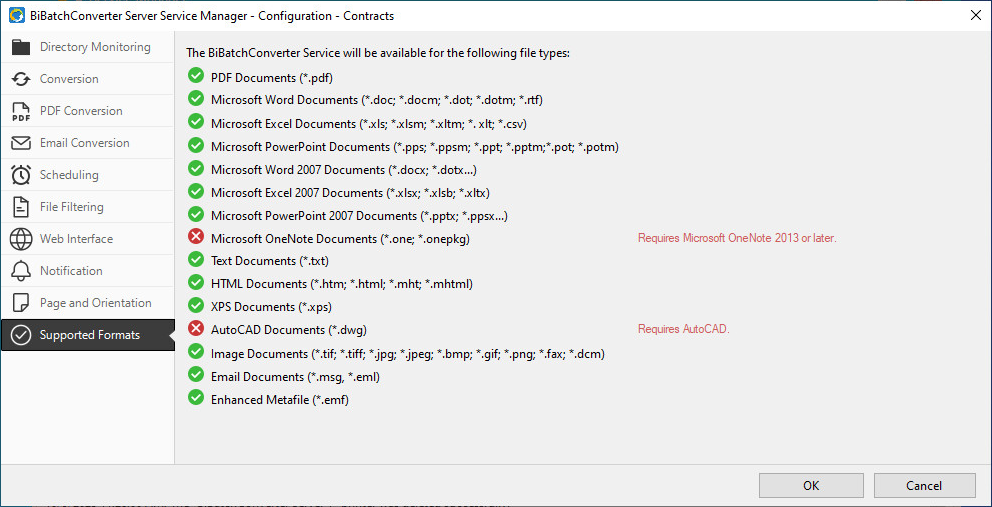
To review the detected applications for the supported file formats, navigate to Configuration > Supported Formats tab. The BiBatchConverter Server Service will be able to convert the file formats marked with green.