 Buy Now
 Download
- time of conversion
- date of conversion
- user or computer names
- page number
- custom text string
The custom file name scheme is built through the Custom File Name dialog.
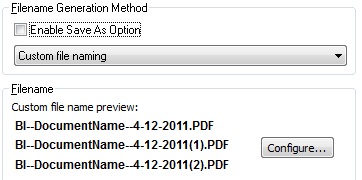
Press the ‘Configure’ button to start the Custom File Name generation window.
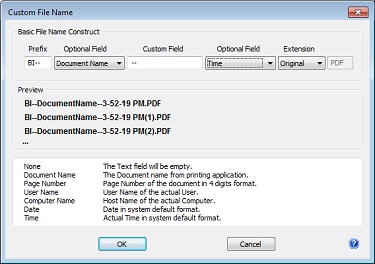
Custom File Name configuration
Prefix can be 4 characters long or empty.
Custom Field can be empty, a separator or used as a custom text filename element.
Optional Field: Several basic tags can be used as an element of the output file name.
| Name | Tag | Description |
| None | empty text | |
| Document Name | <<DOCNAME>> | Inserts the original document’s name into the output file name. Maximum length is 256 characters. |
| User Name | <<USERNAME>> | Inserts the current logged in user into the output file name. |
| Computer Name | <<COMPUTER>> | Inserts the host name of the computer in the output file name. |
| Page Number | <<PAGENUM>> | Inserts the Page number of the document. If multipage document printed as a single file, the value will reflect the total number of pages. |
| Date | <<DATE>> | Inserts the actual system date at the time of printing. The formatting will follow the system’s default format. |
| Time | <<TIME>> | Inserts the actual system time at the time of printing. The format will follow the system’s default format. |
Extension: The extension of the output filename can be specified as well.